MasterChief
Addict
Do you really need your undo.bin? presuming you used the 500gb security sector i presume you will just leave the drive in your Xbox 360?


Yes all the setting are set as said, I have done this before but with a Scorpio blue series. I had the drive flashed with undo.bin before in the winrar undo file that u provided. Now i don't know how to flash it again, it came up with that error. IS THE WHOLE DRIVE CORRUPTED IN DOING THIS UNDO.BIN FILE.Have you set disabled AHCI or set the Sata operation mode to IDE / Legacy? you might be out of luck without your undo.bin unfortunately.
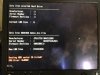
However from your photo it doesn't look like the drive is been read at all, so i question if it even flashed it.
Bricked drive? See more here bricked.drive.txt
Look for this.You will also need the correct undo file.
**text file modified by rick,DIGIEX.NET**
note:This may or may not work, i have not tested it personally.
Thanks will try it, I though it was going to be lost.If the drive was detected before you used hddhackr then you can try undoing the drive.
Use this program to recover the undo file.
Download Recuva 1.50.1036 - FileHippo.com
If you are able to get the undo.bin then proceed to the instructions below.
WD has no recovery files.from xbox.com
Important When you format a storage device, all of the information saved on that device is erased and cannot be recovered. Make sure that you either do not want the information stored on that device or have backed up the information to another device before you continue.
To format a storage device
The console serial number is located on the back of the console and behind the oval door on the front of the console.
- Press the Guide button on your controller, go to Settings, and select System Settings.
- Select Storage or Memory.
- Select the storage device that you want to format, and then press Y on your controller.
- Select Format. You will see the following message:
This will delete all content on this device. Do you wish to continue?
- Select Yes to format the storage device.
- If you are asked to enter your console serial number, do so, and then select Done. This step helps to guard against accidental formatting.
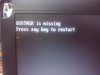
Image is broken. Can you attach the image via go advanced>manage attachments>upload.Hello, when I tried hacking my JHDD, I got this:
and I don't know what I did wrong, can someone help me?
Image is broken. Can you attach the image via go advanced>manage attachments>upload.
Looks like the flash drive wasn't selected for booting. You will need to connect the flash drive with dos & hddhackr on it and connect the the hard drive internally. To select the usb drive for booting press the button for selecting boot device or you can change it in the bios.Im sorry for that
EDIT: I only get this when I put the HDD into my laptop but when I connect it as external drive it tells me there are no ATA devices present