

• Welcome to the Digiex Download Center, you are welcome to download anything you like here. No registration is required! Digiex offers direct download links with no captchas or wait times.
    The team do our best to ensure no content infringes copyrights and provide a DMCA Takedown request form to request the removal of content from Digiex.

    Notable sections: Pokemon Archives | Xbox Archives | Xbox 360 Archives

Hddhackr Undo Files Downloads & Uploads

I have seen a couple of WD5000BEVT but none match the date or does it really matter?

My HDD is WD5000BEVT-00A0RT0
Date : Jan 17 2012.

Also i want to know if the date really matters at all? That way i can use the one that the other fella uploaded.
If it is not possible can i just format the hard drive so i can get it back, because i wont be using it for the xbox no more.
Any help is much appreciated thanks.
It should work, i don't think the date matters.
 
Update: so i used that firmware and i think it bricked my drive because now it reads 0.0GB is there anything i could do to fix this?
 
Sorry for a late response. But do you mean i do it manual as in windows mode? Like they say on this tutorial?
https://digiex.net/guides-reviews/c...box-360-how-flash-your-hddss-bin-windows.html
In the text file linked below it describes a different way of using hddhackr.
Bricked drive? See more here bricked.drive.txt
Look for this.You will also need the correct undo file.
**text file modified by rick,DIGIEX.NET**
note:This may or may not work, i have not tested it personally.
 
In the text file linked below it describes a different way of using hddhackr.

Oh ok thanks i will try that right now

Edit: Ok i tried it and it gives me the same thing should i just consider it a loss or do you still think i can do something.
 
Hello I am having trouble with the undo.bin, i think its the drive I am using WD6400BPVT-00HXZT1, I have been trying 500gb bin, 320 bin doesn't work at all. I think the bins do work its just the undo.bin Im having trouble to name and keep getting checksum error.

I am still not quite sure how the bin files still work but heres my model: WD6400BPVT-00HXZT1, 17 DEC 2012 H.

Also could you explain how the bin files work and the undo.bins too?

Thank You for you time =)
 
Hello I am having trouble with the undo.bin, i think its the drive I am using WD6400BPVT-00HXZT1, I have been trying 500gb bin, 320 bin doesn't work at all. I think the bins do work its just the undo.bin Im having trouble to name and keep getting checksum error.

I am still not quite sure how the bin files still work but heres my model: WD6400BPVT-00HXZT1, 17 DEC 2012 H.

Also could you explain how the bin files work and the undo.bins too?

Thank You for you time =)
The bin files are for converting drives to work on the xbox 360. The undo files revert the drive back to an original state, western digital 250gb,320gb,500gb,ect. If you can't find the right undo file i suggest that you to keep using the drive in the console or format it in a computer and use it for storage on a computer. You will only be able to use 320gb or 250gb of the drive depending on when you flashed the drive.
 
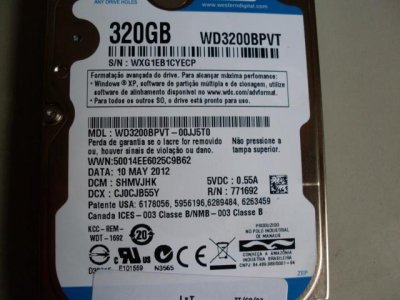
please I need firmware

WD3200BPVT-00JJ5T0

date: 10 may 2012

zuzn.jpg
 
please I need firmware

WD3200BPVT-00JJ5T0

date: 10 may 2012
If you can't find the undo file you have 2 options that will leave the drive in a usable state.
1. Use the drive in the xbox 360
2. Format the drive using windows for storage,install an os,ect and it might not work in an xbox 360. It won't identify itself as an western digital drive and it should work normally.
 

About Digiex

Digiex is a technology and gaming forum, founded in 2004 by InsaneNutter and Nimrod. Digiex has served the internet community with breaking news, detailed guides, exclusive downloads and a popular discussion forum. A small, friendly community of like‑minded people has developed over the years. People are encouraged to register and participate in on‑going discussions.

Get Social

Back
Top Bottom



