
-
 Welcome to the Digiex Download Center, you are welcome to download anything you like here. No registration is required! Digiex offers direct download links with no captchas or wait times.
The team do our best to ensure no content infringes copyrights and provide a DMCA Takedown request form to request the removal of content from Digiex.
Notable sections: Jazz Jackrabbit Archives | Pokemon Archives | Xbox Archives | Xbox 360 Archives
You are using an out of date browser. It may not display this or other websites correctly.
You should upgrade or use an alternative browser.
You should upgrade or use an alternative browser.
Theme Hospital [Full Version Download + Multiplayer Patch + Windows Vista/7 Support]
- Thread starter CurlySteve
- Start date
 Please help!
butterflylb12
New Member
- Joined
- Mar 23, 2011
- Messages
- 1
okay i am a total noob and have no idea what i am doing...can someone take me step by step ob how to download TH to Windows Vista?? I download to Notepad and letters and symbols come up and I have no idea what this means...HELP!!
thanks
L
thanks
L

InsaneNutter
Resident Nutter
okay i am a total noob and have no idea what i am doing...can someone take me step by step ob how to download TH to Windows Vista?? I download to Notepad and letters and symbols come up and I have no idea what this means...HELP!!
thanks
L
https://digiex.net/downloads/downlo...atch-windows-vista-7-support-3.html#post40756
Problems running..
Im having problems getting the game to play.
I have extracted the game to C:\Hospital and it comes up with the game icon.
But it says 'The program can't start because WSnd7R.dll is missing from your computer. Try reinstalling the program to fix this problem' when i try to open it.
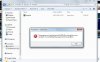
Ive not changed the info through notepad as i dont no how to get the the directory.
Im trying to run the game on my laptop which is Windows 7.
Can anyone help?
Thanks
Im having problems getting the game to play.
I have extracted the game to C:\Hospital and it comes up with the game icon.
But it says 'The program can't start because WSnd7R.dll is missing from your computer. Try reinstalling the program to fix this problem' when i try to open it.
Ive not changed the info through notepad as i dont no how to get the the directory.
Im trying to run the game on my laptop which is Windows 7.
Can anyone help?
Thanks
InsaneNutter
Resident Nutter
You need to extract all the games files, all you have only extracted is hospital.exe
If you look in my Screenshots above you will see they are many files / folders to the game.
If you look in my Screenshots above you will see they are many files / folders to the game.
Hi, I am having trouble when in-game.
After awhile the game crashes, just freezes. So bad that I have to restart the computer.
I also can't save in-game, which I wouldn't really mind if it wouldn't crash.
My question: Is there something I can do to stop it crashing?
After awhile the game crashes, just freezes. So bad that I have to restart the computer.
I also can't save in-game, which I wouldn't really mind if it wouldn't crash.
My question: Is there something I can do to stop it crashing?
Hi I'm also having this problem on vista. I did everything I was told to do by the first post. I extracted the files, went to HOSPITAL.cgf and changed the location to:
INSTALL_PATH=C:\Users\User\Desktop\Kesh\theme_hospital\hospital
then when that didn't work I right clicked on hospital.exe, clicked on properties and selected compatability, 'run as administrator' and then 'run this program in compatibilty mode for windows 95' and still it did not work. Please Help!!! What am I doing wrong?
We have fixed this problem.
What i did and it worked with out the cd error
I followed what they said at the top but i was having problems unzipping it to my c: drive so what i did was created a bullfrog folder on the main c: drive and unziped everything into that folder. so when u go into ur c drive you go into the bullfrom folder or u can name it theme hospital and it shows the folder inside there that you just unziped.
the folder should contain the hospital.cfg that they are talking about so you double click on that and it comes up with what they said comes up.
when i first opened it the text that was in there ALREADY had the / in there so i tryied to run it and it came up WITH the disk error.
i called my dad and all he did was re opened the cfg file and replaced the theme hospital/ with bullfrog/
what im saying is the file name that you make on your c drive that you unzip you files into (mine was bullfrog)
you need to change the name to what that folder is you first made with the / in front and now i dont come up with the disk error.
eg.
C: bullfrog (ur new folder) inside this is all ur unziped info where hospital.cfg is
go into cfg file and it will come up like this
INSTALL_PATH=C:\hospital\
INSTALL_TYPE=MAX
LANGUAGE=ENG
WHAT I PUT!
INSTALL_PATH=C:\bullfrog\
INSTALL_TYPE=MAX
LANGUAGE=ENG
the name needs to be changed to whatever the folder is called that your zip info is in
so folder is named theme hospital you put. NOT just add the / (YOU NEED TO CHANGE THE NAME AND ALSO PUT OR KEEP THE / THERE.)
INSTALL_PATH=C:\theme hospital\
INSTALL_TYPE=MAX
LANGUAGE=ENG
Patrick Buclatin
New Member
- Joined
- May 20, 2011
- Messages
- 1
help my mouse is slow and the graphics is somehow have glitches it would be really nice if you help me ^_^
thank you!
AndymanSE8, I want to thank you many, many, many times for providing such an amazing work! Thank you!!
I like the high resolution support, I like the windowed mode... I didn't have time to play the game thoroughly yet, but everything seems to be excellent at the first glance! Thanks again very very much!
PS: Other solutions posted in this forum didn't work for me. I couldn't get rid of the mouse lag with that affinity thing. My system is intel i7-860 (4 cores 8 threads), windows 7 ultimate 64bit.
AndymanSE8, I want to thank you many, many, many times for providing such an amazing work! Thank you!!
I like the high resolution support, I like the windowed mode... I didn't have time to play the game thoroughly yet, but everything seems to be excellent at the first glance! Thanks again very very much!
PS: Other solutions posted in this forum didn't work for me. I couldn't get rid of the mouse lag with that affinity thing. My system is intel i7-860 (4 cores 8 threads), windows 7 ultimate 64bit.
corsix-th - Project Hosting on Google Code
1. Download.
2. Install.
3. Locate the directory of where Theme Hospital is found.
4. Play.
No colour loss, no mouse lag and includes full screen support, add-ons and plugins!


Tested with Windows 7 Ultimate 64 Bit!
-AndymanSE8.

I'm having issues with the game. 1st I have the mouse lag. I created the batch file as stated and still getting the problem. 2nd the colour keeps inverting. I'm running windows 7 ultimate 32 bit, tried changing the compatibility, run as admin etc. Anyone have any idea?
Cheers
Cheers

Alex303
New Member
- Joined
- Aug 23, 2011
- Messages
- 1
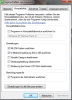
For all who have colour issues. Had the same problem after the installation using Win7 32-bit. It finally worked (for me) with these settings (First use the installation guide on the first post.):
(Attached a screenshot of the settings but it's in german.)
- Right-click on "Hospital.exe".
- Click on "Properties" and go to "Compatibility".
- Click on: "Run in 256 colors", "Run in 640 x 480 screen resolution" and "Run this program as an administrator".
- Click "Apply" and close the window.
- Start "Hospital.exe".
(Attached a screenshot of the settings but it's in german.)
------------------------------------------------------------------------------------------------------------------------------
And for all who want to play the game in German:
For some reason, which I don't know, changing the line LANGUAGE=ENG to LANGUAGE=GERMAN or LANGUAGE=GER and so on won't work (File: HOSPITAL.CFG). So simply do the following after the installation and settings:
And for all who want to play the game in German:
For some reason, which I don't know, changing the line LANGUAGE=ENG to LANGUAGE=GERMAN or LANGUAGE=GER and so on won't work (File: HOSPITAL.CFG). So simply do the following after the installation and settings:
- Go to "Data\LANG-0.dat" and make a backup.
- Copy "LANG-2.dat" which is in the same folder to the desktop.
- Rename "LANG-2.dat" to "LANG-0.dat" and move it back to the Data folder (Overwrite the existing file.).
- Restart your PC (At least I had to do it.) and start "Hospital.exe". The game should now be in german and working without colour issues.
Attachments
Last edited:
works but something is up
game works just fine follwed the instruction and i had no problem installing the game and it plays well now even is the colour is slightly off haha. Thanks to you guys for putting this game up here.
The trouble i'm having is when im playing the game there isnt anybody available to hire. So i can build rooms but can't hire anyone because it allways says there isnt anyone to hire. I was just wondering if anyone else was having this problem or if there was a way to fix it.
Thanks for your time guys
game works just fine follwed the instruction and i had no problem installing the game and it plays well now even is the colour is slightly off haha. Thanks to you guys for putting this game up here.
The trouble i'm having is when im playing the game there isnt anybody available to hire. So i can build rooms but can't hire anyone because it allways says there isnt anyone to hire. I was just wondering if anyone else was having this problem or if there was a way to fix it.
Thanks for your time guys
Rita Isabel Sancho
New Member
- Joined
- Sep 18, 2011
- Messages
- 1
i'm on windows 7 ultimate x64 and the game runs in psychedelic colors, ive the compability mode as windows 95 and run as admin but it still keeps running like this and makes my laptop slower also. any solution?
bushkanaka86
New Member
- Joined
- Oct 12, 2011
- Messages
- 2
Download Freezes
I was wanting to download this but every time I try the download, it starts then ends before it is finished. It claims that the download completed but the it never gets the full file. The odd part is that it seems to download a different amount each time. Sometimes it only gets about 10% then says it is complete and the best it did was 82% before it messed up.
I don't know what is causing it since I can download things from other websites just fine!
I was wanting to download this but every time I try the download, it starts then ends before it is finished. It claims that the download completed but the it never gets the full file. The odd part is that it seems to download a different amount each time. Sometimes it only gets about 10% then says it is complete and the best it did was 82% before it messed up.
I don't know what is causing it since I can download things from other websites just fine!
bushkanaka86
New Member
- Joined
- Oct 12, 2011
- Messages
- 2
Is there any chance someone could download the file and repost it on a different website? This is the only website that has given me download trouble.

Rick
Veteran
try downloading it again,mine reached 100%
Hypertonic
New Member
- Joined
- Oct 13, 2011
- Messages
- 1
This is unplayably buggy. The staff randomly work until energy is 0 and don't sack when you choose to sack instead of give a raise. They also seem to get mad for no reason. Actually, I shouldn't say unplayable. You have to avoid sacking docs that are in the operating theatre.
Last edited:
Similar threads

About Digiex
Digiex is a technology and gaming forum, founded in 2004 by InsaneNutter and Nimrod.
Digiex has served the internet community with breaking news, detailed guides, exclusive downloads and a popular discussion forum. A small, friendly community of like‑minded people has developed over the years. People are encouraged to register and participate in on‑going discussions.
Get Social



