Easily update your Jtagged Xbox 360 to Kernel / Dashboard 12611 with FbBuild 0.11

Ok now I'm confused. My dash show it is 12611, I can run homebrew apps and games that I have previously installed on HDD, but whenever I connect kinector try to run a kinect game the system tells me that I need a system update :(

Please help.
 
Restore the avatars and your Kinect games should work fine, see the FAQ at the bottom of the tutorial on how to do that.
 
I got what the problem is now. You can not alter your KV at all. I was changing my OSIG and dvd key because the orig drive died and i put a benq in not spoofed and it worked until 12611. So if your drive dies your SOL now? Is there a way to alter the OSIG and DVD key and it work?
 
Spoof the OSIG and DVD key on the drive? that way you do not need to modify the keyvault.
 
i have jasper 16mb with freeboot 0.32 with r6t3 removed.
- i dump my nand with fsd 2.0 and get 16mb *.bin file. Are this original nand or freeboot nand?
- how do I know this nand original or freebot?
- can i get the original nand?
- are 1bl key always the same? which part i can see this key from my x360?
- If I fail to update the dashboard, can I restore to its original state?
- whether the games ap 2.5 can run smoothly after updated to 12611? how about old games?
- Someone tell me, i must update with dashlaunch 2.06, it is necessary needed?

Sorry, about the question. I really want to know every detail!
 
i have jasper 16mb with freeboot 0.32 with r6t3 removed.
- i dump my nand with fsd 2.0 and get 16mb *.bin file. Are this original nand or freeboot nand?
- how do I know this nand original or freebot?
- can i get the original nand?
- are 1bl key always the same? which part i can see this key from my x360?
- If I fail to update the dashboard, can I restore to its original state?
- whether the games ap 2.5 can run smoothly after updated to 12611? how about old games?
- Someone tell me, i must update with dashlaunch 2.06, it is necessary needed?

Sorry, about the question. I really want to know every detail!

Ok a few things, you dumped freeboot 9199 v.0032 the original nand is only the first dump before you put freeboot on. I REALLY hope you saved the original in a safe place right? I can't think of the name but there is a prog that can remove freeboot but that's only good if you never touched the KV with any mods. As i found out 12611 has to have a unmodded "original" KV. The 1bl and 2bl are the same on all 360's. As for restoring the dash if you mess up make a backup with flash360 or something similar to restore from xellous if needed, It's not original but the way it is now. Everything runs smooth as ever on 12611 and dashlaunch 2.06 or 2.07 does help me with playing games from internal HDD.
 
Spoof the OSIG and DVD key on the drive? that way you do not need to modify the keyvault.

True this is only offline so i don't need lt+ just lt since lt+ can not be spoofed. Good thinking i forgot about that.

Edit: forgot this 360 had hitachi not liteon so i can spoof it to benq with lt+.
 
Ok a few things, you dumped freeboot 9199 v.0032 the original nand is only the first dump before you put freeboot on. I REALLY hope you saved the original in a safe place right? I can't think of the name but there is a prog that can remove freeboot but that's only good if you never touched the KV with any mods. As i found out 12611 has to have a unmodded "original" KV. The 1bl and 2bl are the same on all 360's. As for restoring the dash if you mess up make a backup with flash360 or something similar to restore from xellous if needed, It's not original but the way it is now. Everything runs smooth as ever on 12611 and dashlaunch 2.06 or 2.07 does help me with playing games from internal HDD.

oh i see, thats mean original dump thats exactly before my xbox installed freeboot.

But sadly, i got my x360 already jtag with freebot 0.32 from game store. I'm not doing jtag stuff by my self. (if it's right, that's mean my x360 don't have original nand)
are this maybe a problem for update process?

About kv, when processing update file with fbbuild, are kv key modded or not?

About dashlaunch, how i suppose use it.
Install it or just copy the file on hdd?
 
oh i see, thats mean original dump thats exactly before my xbox installed freeboot.

But sadly, i got my x360 already jtag with freebot 0.32 from game store. I'm not doing jtag stuff by my self. (if it's right, that's mean my x360 don't have original nand)
are this maybe a problem for update process?

About kv, when processing update file with fbbuild, are kv key modded or not?

About dashlaunch, how i suppose use it.
Install it or just copy the file on hdd?

The easy way is to get easy freeboot with the dump you said you have and if it finishes with no errors flash it to your 360 with flash360 doing option a then b and continue to flash. Follow prompts when done i believe it's back back to shutdown. Power cycle ( unplug power 2 minutes ) and turn on if it boot 12611 ( easy to tell by generic white looks ) then you are ready to install an alt dash like freestyle or xexmenu for file explorer. If it has 2 red lights on top then bottom and rotate ( christmas lights ) then you put the nand dump on a flash drive and name it updflash.bin and hit the dvd eject button with the standard a/v cable plugged in no HDMI and it should say it's updating in 15 seconds and count down. After that it will be back to the dash you have now. after 12611 in on it put dash launch 2.07 on flash drive and use file explorer from dash you installed to run default.xex in dash_launch_v2.07_for_12611\installer folder and follow install. If you want to boot that dash all the now just edit the ini file and put on root to always boot to it first. Hope this helps.
 
If it has 2 red lights on top then bottom and rotate ( christmas lights ) then you put the nand dump on a flash drive and name it updflash.bin

what nand dump? before/original nand or after update process?

for dashlaunch 2.07 which folder i must use it? xellLaunch (default.xex only) or Installer (media folder, file folder and default.xex) so i can access it via fsd?

Thanks bro, and of course for this thread master. My dashboard already12611 now!

I doing just like tutorial and done it without fail!
Now i have dashlaunch 2.07 and avatar 12611 in my xbox.

Thanks a lot from deeper of my heart. GBU!
 
Last edited:
updflash.bin - Where is it when the cmd finishes, ive scoured the whole directory and i cannot find it, it showed me my correct cpu key told me to have a nice day and the .bin file is nowhere to be seen??
 
updflash.bin - Where is it when the cmd finishes, ive scoured the whole directory and i cannot find it, it showed me my correct cpu key told me to have a nice day and the .bin file is nowhere to be seen??
updflash.bin should be in the same directory/folder where fbBuild.exe is.
 
Excellent guide...I was beginning to get discouraged...after 2 FAILS...FINALLY...SUCCESS

Thought this might be helpful to some, since quite a few seem to be having the same problem...

I started off with XBR/8955 on my xenon JTAG console. (DVD drive is spoofed w/ iXtreme..Hitachi047 spoofed to MS25-maybe contributed to my problems)

First, I upgraded to 9199 built from freeBOOT ToolBox Maker, but, I forget which version of the ToolBox...either v2, or v24r3, used pre-JTAG NAND as source - everything was working fine after this update.

Then, I used Jtag Tool 2.20 and used my original pre-JTAG NAND, flashed XBOX - FAIL
Then, I used this guide with my 9199 Freeboot image, flashed XBOX - FAIL
FINALLY, I used this guide, and took my XBR image to extract the KV, SMC, and smc_config - SUCCESS

My FAILs were like many others here...No video, no green ring, no error indicators what-so-ever, and Xell/Xellous was gone.
FIX: I had to re-solder my LPT cable, reflashed xellous (I had to go figure out how to build xellous...I started with JTAG back with Xell), and I put my updflash.bin (the 9199freeboot.bin image) onto a CD as a file, and re-flashed with xellous off CD...I could not find a USB drive that worked with Xellous.

I'll edit and add screen shots from 360 Flash Tool...I don't know what most of the numbers mean, but, looked quite odd to me.
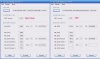
1.jpg2.jpg3.jpg
 
Last edited:
I am having a Problem with updating my dash. I have done everything like the tut says to do but when I get to the command Prompt I can't get pass it I for some reason get an **** could not read .\mydata\smc.bin <-1> **** could someone please tell me what I am doing wrong? Everything else seems to be working like it should I just can't get pass this. Thanks
 
Ok I figured out what I was doing wrong. Now I get a message that says Warning cannot verify smc.bin! If you know this SMC is hacked then disregard this message. Use -v for additional info. Can anyone help me with this? Thanks
 
Ok I figured out what I was doing wrong. Now I get a message that says Warning cannot verify smc.bin! If you know this SMC is hacked then disregard this message. Use -v for additional info. Can anyone help me with this? Thanks

Its possible your Jtag was wired up differently than normal, in which case your SMC will be hacked so that is normal.
You are probably ok, however it would be best to check with the person who Jtagged your console to be sure, as im guessing you did not.
 
Superb guide InsaneNutter, managed to update from 9199 to 12611 without a hitch. One question though, since updating to 12611 my xbox originals have ceased functioning (freezes on the white background with the xbox logo after launching from the dashboard), when I was running fb9199 they worked perfectly. Any ideas how to fix this, all the required compatibility files are on the HDDX partition so I can only assume something changed when flashing the nand. (I used my existing fb9199 dump as a base for the update).
 
Is there any reason that your updflash.bin is 66mb while mine is only 16mb?
Thanks for the guide btw, great work:)
 
Superb guide InsaneNutter, managed to update from 9199 to 12611 without a hitch. One question though, since updating to 12611 my xbox originals have ceased functioning (freezes on the white background with the xbox logo after launching from the dashboard), when I was running fb9199 they worked perfectly. Any ideas how to fix this, all the required compatibility files are on the HDDX partition so I can only assume something changed when flashing the nand. (I used my existing fb9199 dump as a base for the update).

If you install Dash Launch 2.07 original Xbox games should work again. Both Halo / Halo 2 work perfectly for me after doing that.


Is there any reason that your updflash.bin is 66mb while mine is only 16mb?
Thanks for the guide btw, great work:)

That is normal for Jasper consoles with 256 / 512mb nands, anything else should be 16mb.
 

About Digiex

Digiex is a technology and gaming forum, founded in 2004 by InsaneNutter and Nimrod. Digiex has served the internet community with breaking news, detailed guides, exclusive downloads and a popular discussion forum. A small, friendly community of like‑minded people has developed over the years. People are encouraged to register and participate in on‑going discussions.

Get Social

Top Bottom