InsaneNutter
Resident Nutter
My Dashboard says 2.0.9199.0. That would be the latest?
When I plug the Transfer cable to the new 250GB HDD, with the old one still on the console, it shows up as a USB memory. Doesn't tell me how much memory left or the size of the HDD (when I use this drive on the console, it tells me there's 228GB free, of course without anything else oin it like profiles etc). Does that mean it is safe to transfer the original 20GB HDD to this new HDD using the cable? I hear that if its transferred using the transfer cable, the 20GB HDD is wiped clean. I just don't want to stuff up without any means of restoring the content of my 20GB HDD.
ATM I'm using this transfer cable on the PC using Xplorer 360.
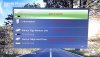
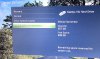
Yes thats the latest official release, if you leave it a few seconds after connecting the drive it should display the free space like this:
Notice the different icons down the left hand side too, does your drive have the hard drive transfer kit icon?
You can press Y on the drive you want to transfer the content from and select transfer content, you can then copy it to the newly hacked drive.
Alternatively and can go on to the old hard drive and manually copy the content one game at at time, although not all games will let you copy the saves for them and you have to move you profiles to the new drive.
If i was you I would copy all the content on your old drive to the PC, then try to transfer content on the console. That way even in the worst case scenario you have a backup of all your files on the PC that you can manually transfer with Xplorer 360. Its good to have backups anyway, I copy all my saves to the PC every few months just to have a backup as I would hate to ever loose them all. No hard drive will last forever sadly.
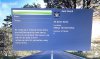

 The flasher puts everything needed on the new drive. The xbox will take it from there