Hack a 250gb, 320gb or 500gb Sata harddrive to work in the Xbox 360 and Xbox 360 Slim

I flashed my WD3200BEVT yesterday. As advised by gangadhartnl i used HDDHACKR 1.22. But i had an error occured at the end "bad or wrong....". So i flashed my HDD with the undo.BIN. I changed my HDDSS.BIN and used HDDHACKR v1.30. I works and i created partitions 1/2/3.

Now i have a new HDD in my XBOX 360 with 293go of free space. This amount of space is normal? Everybody who flashed his HDD has 293go left after flashing? Not 299go?
 
Yes that's normal, you will never actually have 320gb of usable space on a 320gb drive.
The Xbox 360 has various partitions, taking the total free space down you can use for storage to 293gb.
 
Got a problem!

My usb got a malfunction so i lost the UNDO.BIN :(((

I flashed to a 320, it showed as 293, i installed a game to it... then when i turned off turned on the Xbox didnt load. Only later i came to realize that loading was increased to a few minutes not normal seconds. Anyways reflashed the drive to 250, 302, 250 etc. etc. Anyways xbx sees the drive as unformatted, i press format but it stays unformatted after.

What can i do? also on hddhackr 1.30 says created partitions successfully but it never gives me the sign to turn of pc, halts there, 1.25 works ok for this. :S

Also it now sees my drive as hitachi for some reason XD when its a 3200BEVT WD
 
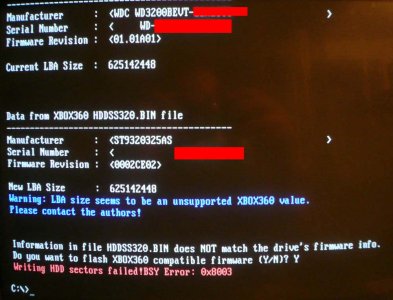
I'm trying to hack my new 320 GB WD3200BEVT Drive

When I try I get this error that: the "LBA size in unsupported" even though the .bin lba matches the drive lba

I tried to go ahead anyway and it failed.

See Screenshot: http://i.imgur.com/xYVEu.jpg

Now when I try again I get the "Reading sector 16 failed"

What am I doing wrong?

http://i.imgur.com/xYVEu.jpg
 

Attachments

  • xYVEu.jpg
    xYVEu.jpg
    87.1 KB · Views: 2,346
I'm trying to hack my new 320 GB WD3200BEVT Drive

When I try I get this error that: the "LBA size in unsupported" even though the .bin lba matches the drive lba

I tried to go ahead anyway and it failed.

See Screenshot: http://i.imgur.com/xYVEu.jpg

Now when I try again I get the "Reading sector 16 failed"

What am I doing wrong?

http://i.imgur.com/xYVEu.jpg
i managed to flashed both my BEVT and BPVT. both having the same 'so called' error message but i went ahead and flashed them. flashed successful. i amusing hddhackr ver 1.30 and via 6421a pci card.
 
Just talked to M$

Me: Hello, I just have a quick question. If I was to use a 3rd party HDD in my xbox 360/360S or was to use software and format one to work would I get banned from XBL? M$s prices are a little steep for a HDD.
Kristina: I can certainly understand wanting to shop for the best deal, I love getting bargains myself. However, for best performance, I would suggest going with a 1st party hard drive. Ultimately, it is up to you. The hard drive will not cause you to be banned from Xbox Live, but there could be unforeseen issues.
Me: Thank you for you help


So as you can see M$ support says you won't get banned.
 
Hey there, just used this tutorial to hack a WD3200BPVT with the HDDSS320.bin and HDDHackr v1.30, worked like a charm, so thanks a lot InsaneNutter. I was just wondering, is there any chance that I may use my old 20GB Hitachi HTS541640J9SA00 x360 HDD in a PC? Is there any way to format it to FAT32 or NTFS?
 
yes.just connect via sata or sata to usb and use disk management to format it (this will probably render the drive unusable on any xbox 360 console)
 
I'm trying to hack my new 320 GB WD3200BEVT Drive

When I try I get this error that: the "LBA size in unsupported" even though the .bin lba matches the drive lba

I tried to go ahead anyway and it failed.

See Screenshot:http://i.imgur.com/xYVEu.jpg

Now when I try again I get the "Reading sector 16 failed"

What am I doing wrong?


I found a third computer and it worked like a charm.

The guide should mention the fact that if you BIOS doesn't give you the option to change AHCI to IDE then it probably won't work...
 
Select the box with 3 dots and choose the USB Drive Boot Files\MS-DOS folder as the location.
I mean i don't have that choice... a window show up where i have to go save the file too. Or to re-word my question: Where on my computer is the "usb drive boot files\ ms-dos" folder located at on my computer? It's not on the jump drive so i have no clue where it could be...
 
thx buddy, i didnt expect they sell hdd shells.

so i get one and load it with a laptop hard drive of any capacity! looks good
 

About Digiex

Digiex is a technology and gaming forum, founded in 2004 by InsaneNutter and Nimrod. Digiex has served the internet community with breaking news, detailed guides, exclusive downloads and a popular discussion forum. A small, friendly community of like‑minded people has developed over the years. People are encouraged to register and participate in on‑going discussions.

Get Social

Back
Top Bottom