Hack a 250gb, 320gb or 500gb Sata harddrive to work in the Xbox 360 and Xbox 360 Slim

try using horizon you can download it here
the device manager automatically mounts your hard drive (works with all hard drives + usb flash drives)
maybe it can detect your drive? (right side in this picture http://www.xboxmb.com/XBox/horizon/tools/main.png )
 
Hi, how long should I be waiting after typing "hddhackr" in the command line? Is it supposed to be instant..?

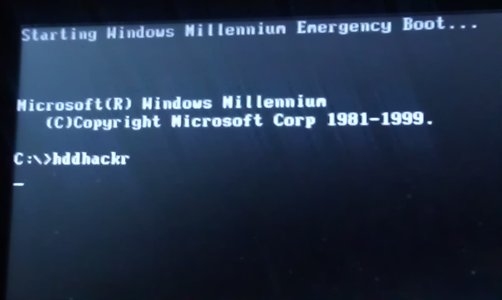
For the past 5 minutes or so, mine just sits at the emergency boot screen with a flashing underscore after I typed hddhackr and pressed enter. It looks like this:

C:\>hddhackr
_

Have I done something wrong?
I'm using the exact same hard drive model as shown (originally came with my old laptop. Just formatted it to factory defaults)
 
Thanks for replying so quickly :)
Is it supposed to be instantaneous or take a while? I just tried typing hddhackr.exe as well and it's still doing the same. Also, the flash drive indeed looks like that :/
 
it should be instant after you press enter.
do this:
move those files somewhere
then re run the dos tool.format and select the ms dos folder
 
I'm sorry, it's still not working. :(

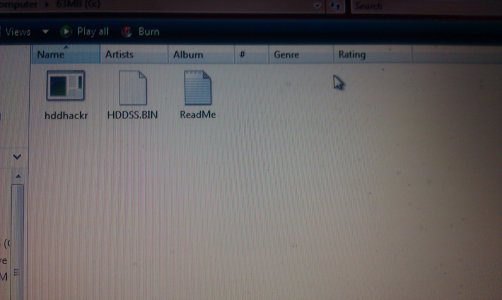
I've attached a picture with the flash drives contents (after completing the bootable drive process, of course) as well as what it looks like while booting and typing hddhackr
 

Attachments

  • IMAG0318.jpg
    IMAG0318.jpg
    1.1 MB · Views: 1,847
  • IMAG0319.jpg
    IMAG0319.jpg
    341 KB · Views: 2,110
see if you change any settings in the bios for ahci or ide

i had to do that for a different dos program before
 
It must be the usb, because I just tried it on another computer. In the BIOS, the option for SATA Controller Mode is AHCI or Compatibility. I took it off AHCI as directed, but it does the same thing as the last computer. Just sits at the command line. The USB drive I'm using is a 63MB Memorex ThumbDrive.

I'll try finding another, in the meantime, any other suggestions are appreciated. This is just my luck. :'(

Edit: Also after attempting the process, it creates 2 new files on the drive called "BOOTLOG", an empty text document, and "BOOTLOG.PRV". I'm not sure what this means.
 
Hi ! I just need play game xbox original, just modify the partition 2. But the restore partition 2 does not end.:'( I ran as administrator but not resolved. Can you help-me ? sorry my english .... :'(
 
Hi ! I just need play game xbox original, just modify the partition 2. But the restore partition 2 does not end.:'( I ran as administrator but not resolved. Can you help-me ? sorry my english .... :'(

format the drive in your console,it will say unformatted or ___GB free press y and format it so it asks for you to enter console serial number.
then go to xplorer 360 to restore partition 2

Alright, using a new flash drive and still nothing. Same outcome as before.

delete the hddhackr file & download it again
 
Still nothing.. I've tried this on three different laptops with both versions of hddhackr, using two separate usb drives. :S

I don't know what else it could be..
 
i have updated bios on many computers with no issues also close all programs,just make sure to not to turn it off or unplug it
 
Well, updated my BIOS (An executable, much easier than I expected.)

As expected, still nada. Zip. Zilch. Zero. :S

No changes, I guess would be the point I'm getting at. Still doesn't work. :(
 

About Digiex

Digiex is a technology and gaming forum, founded in 2004 by InsaneNutter and Nimrod. Digiex has served the internet community with breaking news, detailed guides, exclusive downloads and a popular discussion forum. A small, friendly community of like‑minded people has developed over the years. People are encouraged to register and participate in on‑going discussions.

Get Social

Back
Top Bottom