
You are using an out of date browser. It may not display this or other websites correctly.
You should upgrade or use an alternative browser.
You should upgrade or use an alternative browser.
Hack a 250gb, 320gb or 500gb Sata harddrive to work in the Xbox 360 and Xbox 360 Slim
- Thread starter InsaneNutter
- Start date

Rick
Veteran
For some reason western digital has changed over to naming the drives that, when the drives are actually wd3200bevt or wd3200bevs, ect.I ordered a 320gb Blue series drive which was suppose to be a BEVT but when it arrived it says on the box model WDBAC3200ANC-ERSN is this drive usable? I'll return it if not but thought i'd check first.
Rick
Veteran
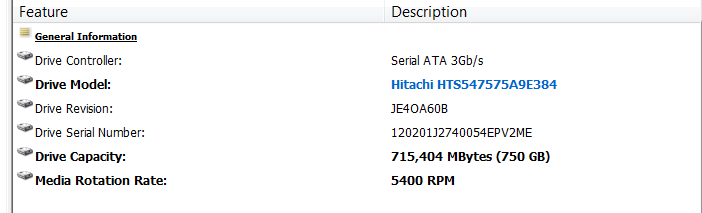
Look under the faq section there is a link to a tutorial that might work.Will someone be able to tell me if the following drive could possibly work :
Drive Model: Hitachi HTS547575A9E384
Drive Capacity: 715,404 MBytes (750 GB)
I know it says clearly that only WD drives work, but I thought i'd give it a try.
Thanks
Hi. Great guide.
I just have a couple of questions before I flash my drive.
1: I'm using a WD1200BEVT, which is of course a 120gb drive. During one of the steps you state that you rename "HDDSS_250GB.BIN" or "HDDSS_320GB.BIN" to "HDDSS.BIN". Will I have a file that will need to be renamed using a 120gb hd? Or do I not mess with anything?
2: I'm just doing this to add space to my 4gb slim for Halo 4 since it requires 8gb. I just happened to have a compatible drive lying around so I figure "why not?". Do I need to mess with any of the Xplorer360 stuff or can I just flash the drive and install? All my profiles and everything are stored on the 4gb of internal memory which is fine, I don't see any need to move them. If I'm missing something crucial here please let me know.
Thanks!
I just have a couple of questions before I flash my drive.
1: I'm using a WD1200BEVT, which is of course a 120gb drive. During one of the steps you state that you rename "HDDSS_250GB.BIN" or "HDDSS_320GB.BIN" to "HDDSS.BIN". Will I have a file that will need to be renamed using a 120gb hd? Or do I not mess with anything?
2: I'm just doing this to add space to my 4gb slim for Halo 4 since it requires 8gb. I just happened to have a compatible drive lying around so I figure "why not?". Do I need to mess with any of the Xplorer360 stuff or can I just flash the drive and install? All my profiles and everything are stored on the 4gb of internal memory which is fine, I don't see any need to move them. If I'm missing something crucial here please let me know.
Thanks!
Rick
Veteran
1.You would use this file here 120gb drive.Hi. Great guide.
I just have a couple of questions before I flash my drive.
1: I'm using a WD1200BEVT, which is of course a 120gb drive. During one of the steps you state that you rename "HDDSS_250GB.BIN" or "HDDSS_320GB.BIN" to "HDDSS.BIN". Will I have a file that will need to be renamed using a 120gb hd? Or do I not mess with anything?
2: I'm just doing this to add space to my 4gb slim for Halo 4 since it requires 8gb. I just happened to have a compatible drive lying around so I figure "why not?". Do I need to mess with any of the Xplorer360 stuff or can I just flash the drive and install? All my profiles and everything are stored on the 4gb of internal memory which is fine, I don't see any need to move them. If I'm missing something crucial here please let me know.
Thanks!
2.You can flash and install.
skellobissis
New Member
- Joined
- Nov 1, 2012
- Messages
- 1
Great tutorial, just have a few questions.
I got into hddhackr, and followed the instructions, and got
could not access the drive with xplorer360 320gb
so i restored from the backup.
From there, i restarted the process, thinking i did something wrong. Then after i got the same results, i went back into hddhackr and created the partitions, as i noted that was not displayed during the initial process.
now in xplorer360 320gb i have this
have i done it right?
Thanks!
I got into hddhackr, and followed the instructions, and got
could not access the drive with xplorer360 320gb
so i restored from the backup.
From there, i restarted the process, thinking i did something wrong. Then after i got the same results, i went back into hddhackr and created the partitions, as i noted that was not displayed during the initial process.
now in xplorer360 320gb i have this
have i done it right?
Thanks!
Rick
Veteran
The first image doesn't display. If the hard drive shows up in the xbox 360's system settings>storage then it should work fine.Great tutorial, just have a few questions.
I got into hddhackr, and followed the instructions,
could not access the drive with xplorer360 320gb
so i restored from the backup.
From there, i restarted the process, thinking i did something wrong. Then after i got the same results, i went back into hddhackr and created the partitions, as i noted that was not displayed during the initial process.
have i done it right?
Thanks!
1.You would use this file here: *removed link so i could post*
2.You can flash and install.
I understand that I need to use the 120gb security sector. My question is do I need to rename the file to HDDSS.BIN like the others? Or just leave it as 120GB_HDDSS.BIN?
Also, another question I have... Can I just burn the HDDHackr to a CD-R and boot to it? Or does it HAVE to be a USB Drive? I don't care about the Undo.BIN file because I'm not going to be using this drive in a computer again. I don't really see a reason I couldn't just boot from a CD other than that fact that it will have to save the Undo.BIN file...
Rick
Veteran
Yes,you rename it to HDDSS.BIN.You would need to create a bootable cd with the dos files & hddhackr files.I understand that I need to use the 120gb security sector. My question is do I need to rename the file to HDDSS.BIN like the others? Or just leave it as 120GB_HDDSS.BIN?
Also, another question I have... Can I just burn the HDDHackr to a CD-R and boot to it? Or does it HAVE to be a USB Drive? I don't care about the Undo.BIN file because I'm not going to be using this drive in a computer again. I don't really see a reason I couldn't just boot from a CD other than that fact that it will have to save the Undo.BIN file...
Yes,you rename it to HDDSS.BIN.You would need to create a bootable cd with the dos files & hddhackr files.
I've got a bootable dos 6.22 iso. I can just burn this and the hddhackr to the cd and run it, or do i need to modify something?
Rick
Veteran
Use poweriso to add those files to the iso and burn the new iso.Make sure its not in any folders.ExampleI've got a bootable dos 6.22 iso. I can just burn this and the hddhackr to the cd and run it, or do i need to modify something?
dos files
hddhackr
120gb bin
PowerISO - Create, Burn, Mount, Edit, Compress, Encrypt, Split, Extract ISO file, ISO/BIN converter, Virtual Drive
Use poweriso to add those files to the iso and burn the new iso.Make sure its not in any folders.Example
dos files
hddhackr
120gb bit
Thanks. I actually got a thumb drive from a friend before you posted this.
I'vef followed the guide exactly, and when prompted to type hddhackr into the dos prompt, it just sits there after typing it and pressing enter. Its as if its taken the command, but nothing happens... any ideas?
Rick
Veteran
Check your manufacturers website for a bios update.Thanks. I actually got a thumb drive from a friend before you posted this.
I'vef followed the guide exactly, and when prompted to type hddhackr into the dos prompt, it just sits there after typing it and pressing enter. Its as if its taken the command, but nothing happens... any ideas?
Rick
Veteran
When this guide was created the old version showed up a partition option. The new version automatically creates the partitions.It should work fine on your console.I flashed my WD2500BEVT but it not create the partition? Where did I go wrong? Also, how do I go about reflashing the drive? I'm assuming I have to use the undo.bin file somehow and that I can't just plug the HD back in and flash it again?
Miroslav Spasovski
New Member
- Joined
- Nov 6, 2012
- Messages
- 1
Where can I find HDDSS.bin for 160Gb HDD, WD1600BEVS
Rick
Veteran
There is no file for 160gb hdd. You will have to use the 120gb file and only 120gb will be usable.Where can I find HDDSS.bin for 160Gb HDD, WD1600BEVS

I could pose the questions another way, but I think it's easiest to do it this way:
What about HDDhackr or xbox mobo power to the HDD would dis-allow this scheme to work on a 3.5 drive? (assuming extension sata and power cables were used out the opening of the HDD bay on the Xbox Slim)
As in:
1)Will the hack work on a 3.5 drive?
2)Will the xbox power a 3.5 drive?
What about HDDhackr or xbox mobo power to the HDD would dis-allow this scheme to work on a 3.5 drive? (assuming extension sata and power cables were used out the opening of the HDD bay on the Xbox Slim)
As in:
1)Will the hack work on a 3.5 drive?
2)Will the xbox power a 3.5 drive?
Rick
Veteran
1.Yes.I could pose the questions another way, but I think it's easiest to do it this way:
What about HDDhackr or xbox mobo power to the HDD would dis-allow this scheme to work on a 3.5 drive? (assuming extension sata and power cables were used out the opening of the HDD bay on the Xbox Slim)
As in:
1)Will the hack work on a 3.5 drive?
2)Will the xbox power a 3.5 drive?
2.Yes but it does require soldering to the motherboard.
About Digiex
Digiex is a technology and gaming forum, founded in 2004 by InsaneNutter and Nimrod.
Digiex has served the internet community with breaking news, detailed guides, exclusive downloads and a popular discussion forum. A small, friendly community of like‑minded people has developed over the years. People are encouraged to register and participate in on‑going discussions.
Get Social



