
You are using an out of date browser. It may not display this or other websites correctly.
You should upgrade or use an alternative browser.
You should upgrade or use an alternative browser.
Hack a 250gb, 320gb or 500gb Sata harddrive to work in the Xbox 360 and Xbox 360 Slim
- Thread starter InsaneNutter
- Start date
AnimaulKing
Member
- Joined
- Dec 21, 2012
- Messages
- 8
the drive im trying to hack is one too....im getting fustrated,,,,,smh

Rick
Veteran
Disconnect all pc hard drives and connect the wd hdd you want to hack to the 1st sata port.nope....its a no go....still see my pc drive....wondering dies that mean its compatible for the hack?
Because if i cant get this soon enough i think i might backup my pc to the drive im trying to hack....smh
Pearlized Pistol
Member
- Joined
- Jan 3, 2013
- Messages
- 10
Updated my BIOS and still no good... Maybe "Raid" is enabled..? I don't see an option to turn that off... Could that be listed as anything else in the BIOS? I know, noob question, but bear with me <.<
Rick
Veteran
Anything like raid. legacy . ide .sata .ahci. If you can post pictures of the bios, that might help.Updated my BIOS and still no good... Maybe "Raid" is enabled..? I don't see an option to turn that off... Could that be listed as anything else in the BIOS? I know, noob question, but bear with me <.<
Pearlized Pistol
Member
- Joined
- Jan 3, 2013
- Messages
- 10
Anything like raid. legacy . ide .sata .ahci. If you can post pictures of the bios, that might help.
Photos of me looking through BIOS, then attempting.
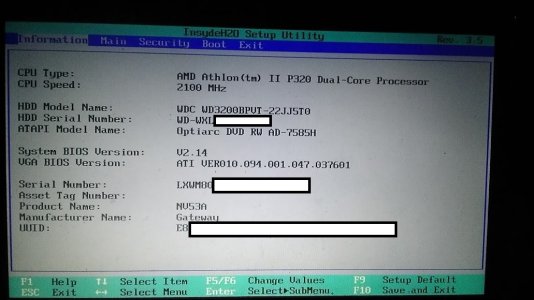
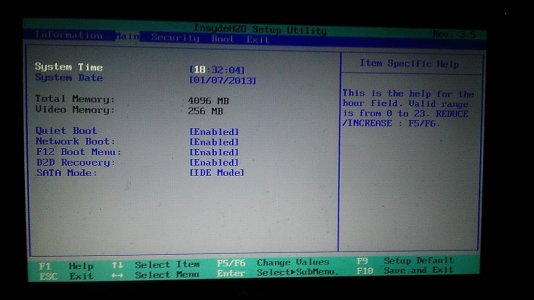
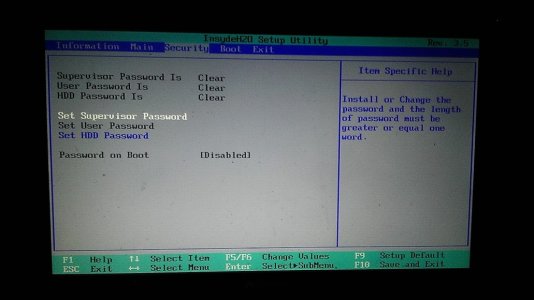
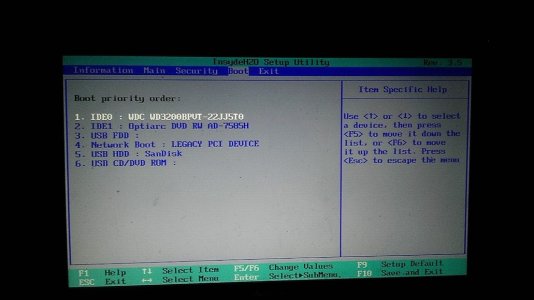
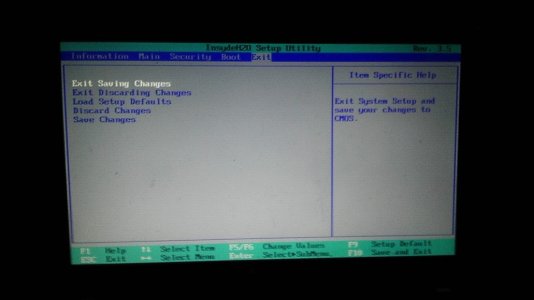
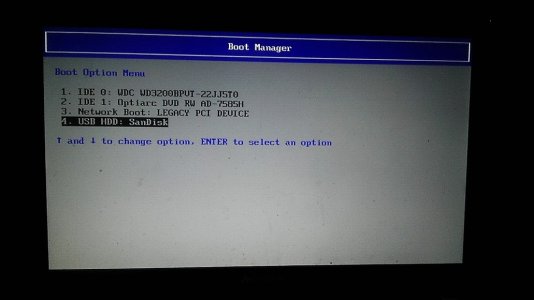
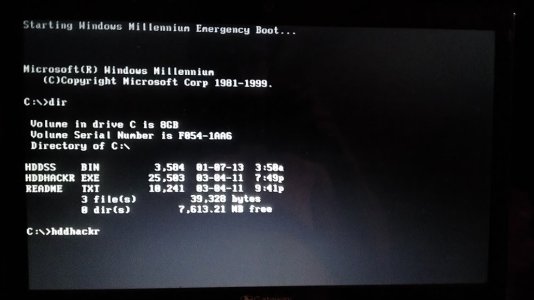
Last edited by a moderator:
Rick
Veteran
In this picture. https://digiex.net/attachments/guid...rive-work-xbox-360-xbox-360-slim-imag0479.jpgPhotos of me looking through BIOS, then attempting.
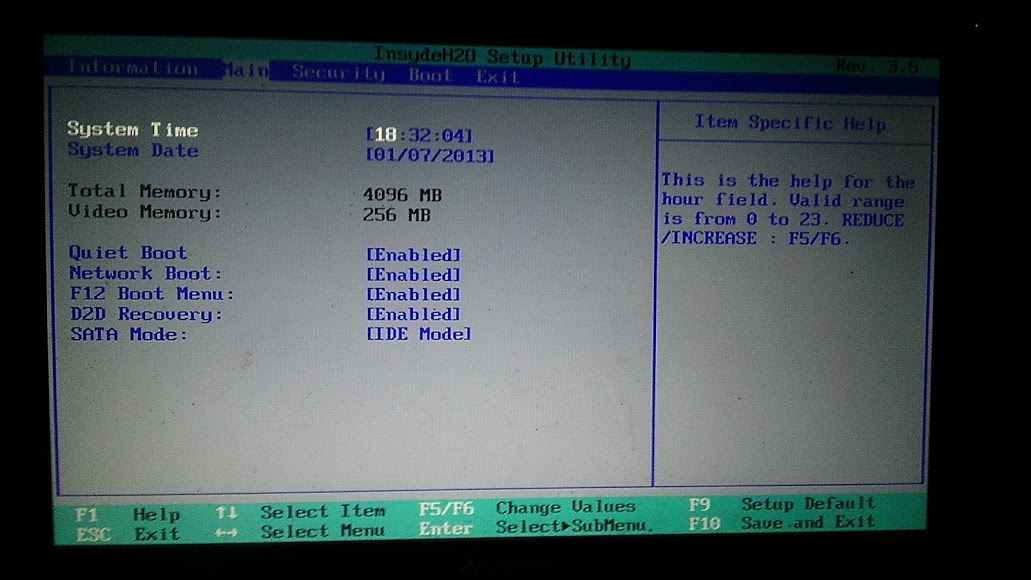
What sata modes are available?
Pearlized Pistol
Member
- Joined
- Jan 3, 2013
- Messages
- 10
In this picture. https://digiex.net/attachments/guid...rive-work-xbox-360-xbox-360-slim-imag0479.jpg
What sata modes are available?
IDE & AHCI... I've tried both just in case, even though I knew that AHCI is not what it should be on.
Rick
Veteran
After looking at your previous posts. Are you still having the issue in bold below? Try typing in hddhackr.exe
I bought the HDD, hooked it up, flashed the USB drive as the guide instructs (It's an 8GB Sandisk) but the formatting tool would only let me pick FAT32, exFAT, or NTFS, no FAT... So I picked FAT32... Then changed the setting from the default AHCI to IDE, booted via USB, typed hddhacker, and it just goes down a line and sits there and I can't do anything but reboot... I've tried it on both my laptop and my gf's, and neither will do anything more... This is really frustrating. What am I doing wrong..?
Pearlized Pistol
Member
- Joined
- Jan 3, 2013
- Messages
- 10
After looking at your previous posts. Are you still having the issue in bold below? Try typing in hddhackr.exe
Yeah, same issue... BTW, I typo'd in that one post, not when entering it in on the boot menu for hacking the drive... If I typo it on the boot menu, it just says "bad command or file" and I can try typing it again... And if you look in my screenshot, I typed it correctly. I've also tried it with and without .exe on the end, and in all caps and all lowercase... Nothing helps

Mantas Jotautis
Member
- Joined
- Oct 8, 2012
- Messages
- 10
there is another way to hack hdd without hddhackr?
Mantas Jotautis
Member
- Joined
- Oct 8, 2012
- Messages
- 10
Yeah, same issue... BTW, I typo'd in that one post, not when entering it in on the boot menu for hacking the drive... If I typo it on the boot menu, it just says "bad command or file" and I can try typing it again... And if you look in my screenshot, I typed it correctly. I've also tried it with and without .exe on the end, and in all caps and all lowercase... Nothing helps
me too the same problem and the boot menu so as to you
Rick
Veteran
Im thinking it has to be a bug with dos and different bios.I will look into this and post a list of fixes that might work.me too the same problem and the boot menu so as to you
Rick
Veteran
Try these.
1.Change usb dos creator folder.
-Select the box with 3 dots and choose the USB Drive Boot Files\MS-DOS folder as the location
-Instead of ms-dos, select folder FreeDOS
-Copy hddhackr & hddss.bin to the usb
-Press enter when it asks for date & time. When C:\ shows up, type in hddhackr.exe or hddhackr
2.Try creating the usb dos with this. Boot and Run DOS from USB | USB Pen Drive Linux
-copy hddhackr & hddss
3.Use a different usb drive.
1.Change usb dos creator folder.
-Select the box with 3 dots and choose the USB Drive Boot Files\MS-DOS folder as the location
-Instead of ms-dos, select folder FreeDOS
-Copy hddhackr & hddss.bin to the usb
-Press enter when it asks for date & time. When C:\ shows up, type in hddhackr.exe or hddhackr
2.Try creating the usb dos with this. Boot and Run DOS from USB | USB Pen Drive Linux
-copy hddhackr & hddss
3.Use a different usb drive.
I've successfully hacked my 250 gb drive so that my xbox 360 sees it. I formatted it on my xbox 360 with no problems and it seems like all of the storage is available. Now I want to add partition 2 so that I can play old xbox 360 games. But I can't find a copy of Xplorer 360 Extreme 2 that is not corrupted with malware. Does anyone know where I can get an un-infected copy?
Mantas Jotautis
Member
- Joined
- Oct 8, 2012
- Messages
- 10
Try these.
1.Change usb dos creator folder.
-Select the box with 3 dots and choose the USB Drive Boot Files\MS-DOS folder as the location
-Instead of ms-dos, select folder FreeDOS
-Copy hddhackr & hddss.bin to the usb
-Press enter when it asks for date & time. When C:\ shows up, type in hddhackr.exe or hddhackr
Sorry, but I did not understand how to change the folder, just selected? And as with the date and time of what to do there?
Rick
Veteran
Just download it here: https://download.digiex.net/Consoles/Xbox360/AppsPC/Xplorer360Extreme2.zipI've successfully hacked my 250 gb drive so that my xbox 360 sees it. I formatted it on my xbox 360 with no problems and it seems like all of the storage is available. Now I want to add partition 2 so that I can play old xbox 360 games. But I can't find a copy of Xplorer 360 Extreme 2 that is not corrupted with malware. Does anyone know where I can get an un-infected copy?
Your anti-virus must be flagging that as a virus.It has no malware or viruses.
Open the dos for usb program and choose the folder freedos.(see image link below)Sorry, but I did not understand how to change the folder, just selected? And as with the date and time of what to do there?
http://gyazo.com/a2156e0cafc21145071978a710fc07e9.png
For the date and time press enter.
Mantas Jotautis
Member
- Joined
- Oct 8, 2012
- Messages
- 10
Try these.
1.Change usb dos creator folder.
-Select the box with 3 dots and choose the USB Drive Boot Files\MS-DOS folder as the location
-Instead of ms-dos, select folder FreeDOS
-Copy hddhackr & hddss.bin to the usb
-Press enter when it asks for date & time. When C:\ shows up, type in hddhackr.exe or hddhackr
2.Try creating the usb dos with this. Boot and Run DOS from USB | USB Pen Drive Linux
-copy hddhackr & hddss
3.Use a different usb drive.
succeeded with FreeDOS hacked hdd like you said
 . How will it be done only at the MS-DOS and with FreeDOS. but nzn or hdd works because I do not have db xbox just weekend you can check, but when I combine hdd to pc and trying too Put your Xplorer360 Extreme2 me he can not find what to do? Do I need xbox formatted hdd?
Just download it here: https://download.digiex.net/Consoles/Xbox360/AppsPC/Xplorer360Extreme2.zip
Your anti-virus must be flagging that as a virus.It has no malware or viruses.
Everything is working great. No Malware seems to have infected my computer and I'm able to play old games now. Thanks for the help!
About Digiex
Digiex is a technology and gaming forum, founded in 2004 by InsaneNutter and Nimrod.
Digiex has served the internet community with breaking news, detailed guides, exclusive downloads and a popular discussion forum. A small, friendly community of like‑minded people has developed over the years. People are encouraged to register and participate in on‑going discussions.
Get Social



