Rick
Veteran
As many users flash their hard drives with hddhackr, some people may lose or delete their undo files accidentally. To prevent this I have created this thread so anyone can upload and download their undo files here at anytime.If you're searching for undo files for your drive you can download them here.
If you are uploading an undo file for your western digital hard drive provide the following info.
This will be useful to people who have the same drive and they want to undo their drives.Using any of the undo files could brick your hard drive, just make sure to use the file that is exact to your hard drive model number.
Example. This is not a match
WD2500BEVT-60ZCT1 (Drive) WD2500BEVT-00ZCT0 (File)
Example. The model numbers match.
WD2500BEVT-60ZCT1 (Drive) WD2500BEVT-60ZCT1 (File)
How to upload to digiex.
My first drive.
Model number: WD2500BEVT-60ZCT1
Date: 07 AUG 2009
Second Drive
Model number: WD2500BEVT-00A23T0
Date: 27 AUG 2011
Third Drive
Model Number WD5000LPVX-00V0TT0
Date April 26 2014
Here are some of the other files that were posted on the hddhackr guide
Bricked drive? See more here bricked.drive.txt
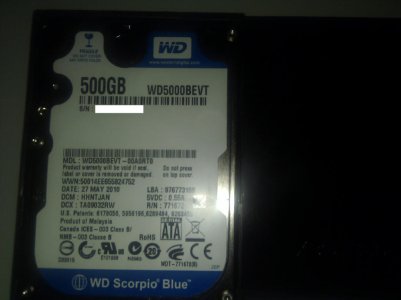
Look for this.You will also need the correct undo file.
**text file modified by rick,DIGIEX.NET**
note:This may or may not work, i have not tested it personally.
If you are uploading an undo file for your western digital hard drive provide the following info.
- Hard drive model number (Next to MDL)
- The production date of the drive. (Next to DATE)
This will be useful to people who have the same drive and they want to undo their drives.Using any of the undo files could brick your hard drive, just make sure to use the file that is exact to your hard drive model number.
Example. This is not a match
WD2500BEVT-60ZCT1 (Drive) WD2500BEVT-00ZCT0 (File)
Example. The model numbers match.
WD2500BEVT-60ZCT1 (Drive) WD2500BEVT-60ZCT1 (File)
How to upload to digiex.
1.Zip your undo file in a .zip or .rar file
2.Click on go advanced.
3.Scroll down until you see Manage Attachments: Click on the button to the right of that.
4.You will see a window pop up that says Upload Files from your Computer,click on browse and select your rar or zip file and then select ok, then press upload. After a few seconds it should have refreshed and added to the post, you can close the pop-up window.
5.You can fill in the post with the hard drive info and click on submit reply.
2.Click on go advanced.
3.Scroll down until you see Manage Attachments: Click on the button to the right of that.
4.You will see a window pop up that says Upload Files from your Computer,click on browse and select your rar or zip file and then select ok, then press upload. After a few seconds it should have refreshed and added to the post, you can close the pop-up window.
5.You can fill in the post with the hard drive info and click on submit reply.
Model number: WD2500BEVT-60ZCT1
Date: 07 AUG 2009
Second Drive
Model number: WD2500BEVT-00A23T0
Date: 27 AUG 2011
Third Drive
Model Number WD5000LPVX-00V0TT0
Date April 26 2014
Here are some of the other files that were posted on the hddhackr guide
Bricked drive? See more here bricked.drive.txt
Look for this.You will also need the correct undo file.
**text file modified by rick,DIGIEX.NET**
note:This may or may not work, i have not tested it personally.