Hack a 250gb, 320gb or 500gb Sata harddrive to work in the Xbox 360 and Xbox 360 Slim

You are telling hddhackr to use the drive at 09F0, however in the photo above your drive is at D080. So try "hddhackr C D080 A0" and see if that will create the partitions.

I'm not sure why it will not save undo.bin to your flash drive, does the drive have some switch on that write protects it?
 
Well now i finally managed to flash de hd but guess what? yeah you are right when i plug it to the xbox nothing happen its just like before i only have the 4gig mem. Well anyway i've tried looks like this isn't for me.


thanx for the help anyway xd
 
Do you know if the WD Scorpio Black WD5000BPKT will work? I noticed on the Xbox hard drive packaging that "500gb" is an option, implying Microsoft will eventually release a HDD that size. Since the WD5000BPKT is only $15 more than the WD2500BEKT (on NewEgg.com), I assume just buy the bigger one, run the 250gb hack in the mean time, and be ready to upgrade when available.

Any thoughts?
 
Error Problem

Hello guys heres the problem im having. To start off with I have a WD Scorpio Blue WD2500BEVT. Everything goes fine i followed and downloaded everything it said to. When i get to the part that says press F to flash, I do that and it takes me to the part where it asks you to enter HDDS.BIN. I enter that and Press enter with no problems but next is where the problem comes the next line ask that I enter UNDO.BIN. The problem is when i extracted those files to my flash drive there was no UNDO.BIN and this is the first time I have ever attached this hdd to my PC and done this to flash it so it has never been flashed before. It seems like for everyone else it doesnt ask this step. How would i go about skipping it or fixing that problem.
 
Great guide! But I have a problem. I get the Bad/Wrong Modelnumber offset! error. The disk I have is a WD2500BEVT manufactured in 10 FEB 2011. From what I have read it should be that the disk is to new? The latest hddhackr is from 03/2011 so can I have gotten a disk that wasnt shipped when that version was released?
 
Hello guys heres the problem im having. To start off with I have a WD Scorpio Blue WD2500BEVT. Everything goes fine i followed and downloaded everything it said to. When i get to the part that says press F to flash, I do that and it takes me to the part where it asks you to enter HDDS.BIN. I enter that and Press enter with no problems but next is where the problem comes the next line ask that I enter UNDO.BIN. The problem is when i extracted those files to my flash drive there was no UNDO.BIN and this is the first time I have ever attached this hdd to my PC and done this to flash it so it has never been flashed before. It seems like for everyone else it doesnt ask this step. How would i go about skipping it or fixing that problem.

Try writing UNDO.BIN . I believe hhdhackr is asking you to name your "restorefile" in other words your UNDO.BIN file. When you write UNDO.IMG it will create your UNDO.IMG to the flashdrive.
 
What happens if...

I buy a 3rd party 120GB HDD with the security sector already setup on it?

Should I attach it to the console first (and format it), then re-attach my 20GB drive and use a migration cable to transfer the 20GB HDD's saved games to the 120GB HDD?

Or, should I just follow these instructions here?

Alternatively, could I just attach an external USB HD, transfer the data off of the 20GB, and then attach the 120GB HDD once it's formatted and just copy onto the 120GB? Would that work as well?

BTW, I don't need the Xbox 1 emulation since I have a working Xbox 1 still in the house.
 
do your method.just make sure not to configure any hard drives in memory section connected via usb or you will lose ALL data
 
do your method.just make sure not to configure any hard drives in memory section connected via usb or you will lose ALL data

So, which method would be the most likely to work? Right now, I'm thinking that the following would be best;


  1. Transfer data off of 20GB HDD, via USB, to external HD (my USB keys are all 8GB or less, so I want to use my WD Passport 320GB external drive). I figure I have about 10GB of data on the HDD presently.
  2. Remove 20GB drive, place 3rd party 120GB drive on console.
  3. Format 120GB drive using console.
  4. Transfer data from external HDD to 120GB drive.
However, I have no experience with M$'s security measures to prevent piracy, so I'm unsure if the above method would result in a data wipe or not.

As an aside: I find it ridiculous that I buy a M$ console, purchase DLC/Add-ons/everything with M$ points through Live, pay for a Gold membership every year to play with others and then M$ makes such an effort to prevent me from expanding my drive space.
 
If you are actually buying a 120gb drive in an enclosure you could copy 7gb or so worth of data to your flash drive, swap the 20gig with the 120gig in the 360 and move the contents of the flash drive to the 120gb drive.

After put the 20gb drive back in the 360 and repeat the process. As the 20gb drives only have around 13gb of usable space you would probably only have to do that twice.

As an aside: I find it ridiculous that I buy a M$ console, purchase DLC/Add-ons/everything with M$ points through Live, pay for a Gold membership every year to play with others and then M$ makes such an effort to prevent me from expanding my drive space.

Thats the only thing I dislike about the 360, anything extra you need to buy for the console is massively over priced (wireless adapter, hard drives and so on). To me anyway it is still the best gaming experience out there, its just not a cheap one when you want to make the most of the console.
 
Thats the only thing I dislike about the 360, anything extra you need to buy for the console is massively over priced (wireless adapter, hard drives and so on). To me anyway it is still the best gaming experience out there, its just not a cheap one when you want to make the most of the console.

Agreed, I love Forza 2/3 on the Xbox at it is the primary reason I even need a larger drive (car packs run >100MB, and track maps run >400MB each).

Just to be clear, I bought one of those 3rd party 120GB knock-offs on eBay that come in a M$ looking enclosure. Most likely, will I have to format the 120GB HDD first in order for me to transfer the data back, or should it just be plug-n-play? I guess I'm not counting on a lot of support from the seller of the 120GB drive, so I just want to make sure I don't brick the drive or lose all of my data.

OT: For the wireless adapter 'massively overpriced' problem, I simply used an AP in reverse. Typically, an AP is used to extend the range of a wireless network from the router out. The AP is connected via Cat5 cable to the wireless router and then set far enough away to enhance the range of the network. In my case, instead of connecting the AP to the router, I connected it to the Xbox's NIC and then used the wireless signal to transport to the router. I originally purchased a $30 TrendNet AP and spent about 2 hours of my time figuring out how to do it (there was no guide online at the time I attempted this). In the last couple of years though, I had a few wireless routers lying about, and decided to flash the firmware with dd-wrt (linux based router software) to get more functionality and then plugged the my Xbox's (360 and original), and my Blu-ray into the switch ports in the back. Now, in addition to now having a homemade 'wireless adapter' for the Xbox's and Blu-ray player (the Blu-ray has Netflix, Facebook and other net apps), I've also extended my network for the other wireless devices in my house that are further away from my router...much better solution than M$'s.
 
When i upgraded my hard drive I wanted to buy some of the larger arcade games and be able to install my retail games to silence the DVD drive.

Why not go for a 250gig drive? when i looked in to all this and created the tutorial back in 2009 I think there was only a £5 difference between the 120gig and 250gig drives, i'm not sure how that will translate to the knock off market on eBay however, I would guess the 250gig drives are a lot more.

The knock off's you buy on eBay are hacked the same way as in this tutorial, so should already be formatted and ready to use, just like a legit 360 hard drive.

I never did buy the 360 wireless adapter either, I used to use a laptop as a network bridge. I have long since wired the house with network wall points in each room, each room has a gigabit switch connected to the wall point. Each of these switches connect to the router so any device that supports it can get gigabit speeds. I have a couple of routers routers flashed with custom firmware too, I did use to use DD-WRT, however have moved to the Tomato firmware now.
 
When i upgraded my hard drive I wanted to buy some of the larger arcade games and be able to install my retail games to silence the DVD drive.

Why not go for a 250gig drive? when i looked in to all this and created the tutorial back in 2009 I think there was only a £5 difference between the 120gig and 250gig drives, i'm not sure how that will translate to the knock off market on eBay however, I would guess the 250gig drives are a lot more.

The knock off's you buy on eBay are hacked the same way as in this tutorial, so should already be formatted and ready to use, just like a legit 360 hard drive.

Upon checking, you're absolutely right about the pricing. At first, I didn't know I was looking at a knock-off, and I wasn't willing to pay my pre-conception of what the 250GB would cost. If I were doing it again today, I'd get the 250GB.

That's good to know about the knock-offs, that means my job should be very easy.

I never did buy the 360 wireless adapter either, I used to use a laptop as a network bridge. I have long since wired the house with network wall points in each room, each room has a gigabit switch connected to the wall point. Each of these switches connect to the router so any device that supports it can get gigabit speeds. I have a couple of routers routers flashed with custom firmware too, I did use to use DD-WRT, however have moved to the Tomato firmware now.

I'm more of a linux geek, so I was more motivated to get the dd-wrt to work and then I never went back and fixed what wasn't broke (tweaked a little though). Running cable in my present house, not an option. My previous house though, it was a necessity and I've never been a fan of wireless myself but the wife wouldn't stand for running cable over the floor :D
 
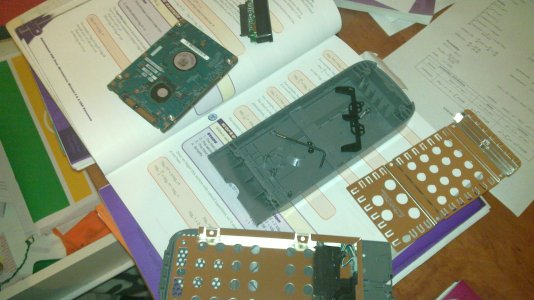
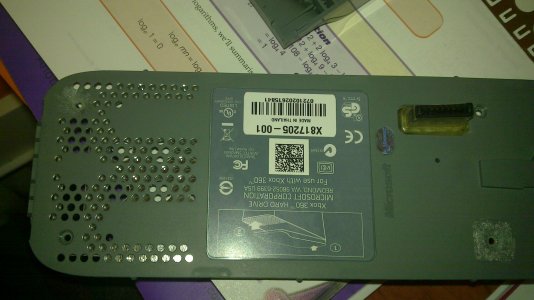
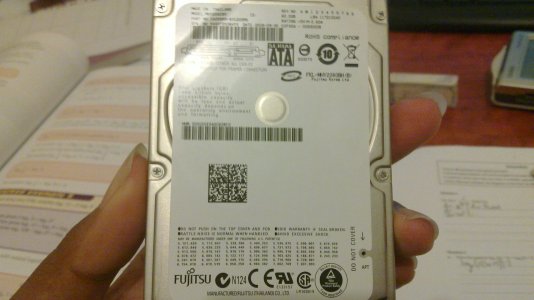
Hey nutter and rick, just to let you know when i took apart my HDD i was expecting to see a WD HDD inside, but to my surprise i found a fujitsu HDD in mine, so thus im guessing that HDD hacking is actually not limited to WD hdds, but Fujitsu ones to even though there is no actual files for it.

Heres Proof
attachment.php

attachment.php

attachment.php
 

Attachments

  • 20101031_001.jpg
    20101031_001.jpg
    652.1 KB · Views: 5,731
  • 20101031_002.jpg
    20101031_002.jpg
    610 KB · Views: 5,651
  • 20101031_003.jpg
    20101031_003.jpg
    569.9 KB · Views: 5,299
Is that a retail ms hdd? They have some tool that creates these hard drives. WD is much better to use imo.
 
Yes it is a retail M$ HDD came with my 60GB pro console which i got approx 3-4 years ago, im trying currently to get in touch with TheSpecialist to see if i can manually hex edit the sectors so that fujitsu can be used to boot
 
Retail Xbox 360 hard drives have been various different brands over the years, I have a 20gb Segate and Samsung here.

Its only Western Digital drives you can hack your self however.

From the Hddhackr FAQ:

Q. Could you do this for my Seagate, Maxtor, Samsung or whatever drive too ?
A. Yes, but I don't have plans to do so. It is a lot of work to convert this tool for usage with other brands and don't think it is worth the trouble.
 

About Digiex

Digiex is a technology and gaming forum, founded in 2004 by InsaneNutter and Nimrod. Digiex has served the internet community with breaking news, detailed guides, exclusive downloads and a popular discussion forum. A small, friendly community of like‑minded people has developed over the years. People are encouraged to register and participate in on‑going discussions.

Get Social

Back
Top Bottom