Hack a 250gb, 320gb or 500gb Sata harddrive to work in the Xbox 360 and Xbox 360 Slim

run hddhackr and use the create partitions option then try to transfer partition 2


run hddhackr and use the create partitions option then try to transfer partition 2 *this will erase anything you copied to the hard drive

Hi thanks for the response i have used hddhackr and created the partitions its just when i try to restore partition 2 it takes ages and never finishes restoring it just keeps half loading the bar then restarting and ideas?
 
Or what if i bought a new 320gb wd hdd, same model BEKT, and perform hddhackr and kept the undo file. Could it be used to recover both hdd's??

This is interesting to know. Went out bought the exact same model hdd. though s/n are different. Got the undo.bin from hdd#2 and it worked to restore hdd#1 as well. Returned the one i bought.

So for anyone who lost the undo.bin file. Go get the exact same model, flash it, keep undo.bin, and restore the hdd's. then return it:D
 
I have WD but 320 GB .. Is this going to work as 250 GB ?
If yes .. I should download the security sector for 250 GB ??! Right !
ThaanX
 
It should work just fine with the 250GB security sectors. That being said obviously only 250GB of it will work on the 360.
 
Hey, I just bought a WD Scorpio 80GB - WD800BEVS - (trying to use it as a 60GB) and it flashes fine but the xbox 360 (slim) says it's unformatted (I've tried formatting it via the xbox and that doesn't work) and in xplorer360 I get an error code "Failed To Read Cluster Chain Map" and then it doesn't detect partition 3, I can only see partitions 0 & 2.

I've had a look around and some people suggested using xport instead of xplorer but xport doesn't even detect an xbox compatible hdd.

Anyone else had a similar problem and solved it? Or any ideas at all would be helpful :) lol

Edit: Just read back a few pages to see if anyone else had similar problems but I came across Ibrahim Khan Jadoon's post and followed that and plugged it into the xbox and it still didn't work but I decided to format it again to see if that helped and it did! So now it works but I tried to restore partition 2 through xplorer 360 (I see all 3 partitions now! lol) and it restored fine, but when I plugged it back into the xbox, it said it was unformatted again, so I formatted it and it worked again so I think I'm just gonna leave it at that lol
 
Nvm this post, after removing, re putting it back in. Removing it again, and then reputting it back in again. And shutting it down, and then removing the power supply, it is now working. This post can be deleted.
 
Last edited:
Great guide. I do have a question. What is the possibility of getting banned using another HDD? I know with the older 360 HDD, adding a different none MS drive could get you banned. Has that changed?
 
Hddhackr was released in January 2007, at no point has anyone ever got banned for using a hacked drive.

By hacking a drive the only thing you really gain apart from having more space to install games is the ability to buy more DLC, arcade games and games on demand titles. If anything the more people that have bigger hard drives the better, as more content can be purchased.
 
Hddhackr was released in January 2007, at no point has anyone ever got banned for using a hacked drive.

By hacking a drive the only thing you really gain apart from having more space to install games is the ability to buy more DLC, arcade games and games on demand titles. If anything the more people that have bigger hard drives the better, as more content can be purchased.


That's what I wanted to hear. Thanks for the fast response.
 
Hello,

is there a way to restore Partition 2 to the HDD when I only have one sata connection on my pc?
I can't boot Windows and have the HDD connected at the same time.
I already downloaded the Partion 2 file somewhere on this site.
 
hey i have everything needed to do this i install the hard drive into the only sata slot on my mother board turn it on and boot up my usb and then hddhackr then its looks for my hdd but its comes up "No ATA Present" what could be the problem? please help!
 
hey i have everything needed to do this i install the hard drive into the only sata slot on my mother board turn it on and boot up my usb and then hddhackr then its looks for my hdd but its comes up "No ATA Present" what could be the problem? please help!

look in the bios for anything with sata or ahci and see if you can change it
when your done flashing reverse the changes
 
hi,

first, thanks nutter for the help, i got the "vendor intro failed" but i just switched the sata port to a reg 3gbs port instead of a 6gbs one.

after i press yes for the "do you still want to flash 360 firmware", i get a sucessful message and a message saying it should now be ready to put onto the 360, shut the computer off, not restart, blah blah blah

bsaically, the message tells me im good to go, however, it never asked me to partition, or if i wanted to. does the newer version of hddhackr automtically do that?

i downloaded a map pack to the harddrive, no problem, and it even has the "microsoft" picture in the memory menu, so it appears to be all good

should i run a xbox 1 game to see if partition 2 copied? like halo 2?

thanks
 
The drive should have hacked fine, you have to restore partition 2 for the xbox emulator to work.

If it does not restore like stated in the tutorial, run Hddhackr again and re create the partitions.

I think you should be good however.
 
yup, the harddrive didnt partition, halo 2 and forza wouldnt play

how would i parition the drive when hddhackr didnt ask me if i wanted to or not.

is there a command i could type in MS DOS?

should i reflash my harddrive first then partition?

thanks
 
this tutorial is not built for hddhackr.exe version 1.30. Use hddhackr version 1.25 for this tutorial...that v 1.30 link should be removed.

If you want to use v 1.30:

Run hddhackr and note the port your 250gb is on. The port is the alphanumeric sequence in bold:

0) 0x09e0 sata sec master wdc wd2500bevt-00zct 11.01a11

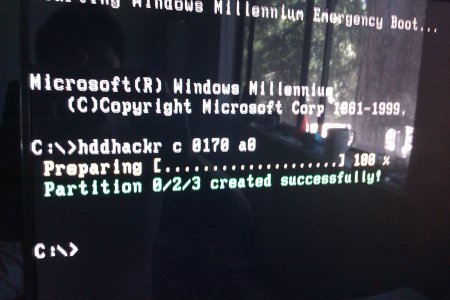
flash it using the method described in the tutorial. you will notice it didn't ask you to create partitions 0/2/3. because it didn't! go ahead and restart your computer as it tells, but boot into the drive with hddackr on it again. You need to create those three partitions. Do not type in "hddhackr" at the c:\ prompt. Instead, type this and repleace 09e0 with your own port:

Hddhackr c 09e0 a0

this will create the three partitions. If you're using xplorer to put some files back/restore partition 2, it will most likely give you an error like "fatx drive not found" or something. before using xplorer 360 to put your files back, you need to put this new, hddhackr'd drive into your xbox 360, format it via drive settings or whatever, and create a new offline profile.

This will format the drive as fatx and create the necessary folders. I don't know if you need to make a new offline profile, but i did.

Then you may replace partition 2 with xplorer 360 and your profiles/save games with xplorer 360 250gb edition.

Whew...this guide needs to be updated! It does not work as wrttien.

~ibrahim~



this!!!!!!!!!!!!!!!!!!!


or, after you flash, run hddhackr again and select the drive, then enter c to create partition.
 
even after partitioning, halo 2 or forza still wont play, the 360 displays the "game couldnt start. try downloading the game again" message. IMAG0240.jpg
 

About Digiex

Digiex is a technology and gaming forum, founded in 2004 by InsaneNutter and Nimrod. Digiex has served the internet community with breaking news, detailed guides, exclusive downloads and a popular discussion forum. A small, friendly community of like‑minded people has developed over the years. People are encouraged to register and participate in on‑going discussions.

Get Social

Back
Top Bottom