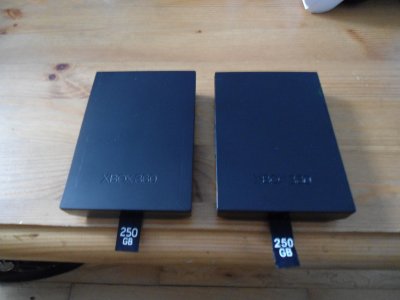
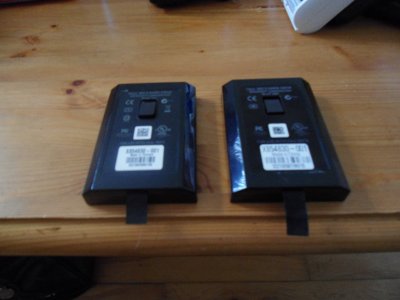
Hack a 250gb, 320gb or 500gb Sata harddrive to work in the Xbox 360 and Xbox 360 Slim

You can only use 120gb due to that size being released.
 
Which one is the original?

Can you tell me which one is the fake?
 

Attachments

  • DSC00368.JPG
    DSC00368.JPG
    4.1 MB · Views: 2,862
I just want to say thanks for the tutorial. I read the first couple pages of comments but not all 30 something so I apologize if I repeat anything.

I recently followed it and hacked a 320gb Scorpio black without much issues. I went from a 20gb. Just a few issues, all end user problems, not caused by the instructions. When I was extracting my partition 3 I got an error with xplorer360 and when I went to re-extract it all the files were gone. Luckily I had done a backup image of my drive. To anyone reading, first thing you should do is File/Backup Image. It takes some time but could save you lose of all your stuff. Oh also, when using hddhackr I was not given the option to format the 0/2/3 partition, I had to manually select it after I flashed. Actually I had to re-run hdddhackr and choose it I think.

When restoring the image with xplorer360 I left it running for ages and it never completed so I used WinHex to restore it. Google "Fix / Restore original 20/60/120 GB HDD after Xplorer ruins it". Nothing against Xplorer360, chances are it was user error or a Windows problem not Xplorer360's. I did not do the last part where you have to boot into dos and run mhdd, just the restore but I've not tried my 20gb in my xbox again either.

If the backing up wasn't clear enough for people, user xplorer360 to first, do a backup image, then go to file and do the partition 2 bit and then right click on partition 3 and extract it. Use the same xplorer360 to restore partition 2 to your new drive and use the size specific xplorer360 to drag and drop the folders from your partition 3 backup to your new drive. That is what I did and when I put my hard drive in all was good. My profile autoloaded, all saved and my lone installed game even.

After having a 20gb hard drive for five years or however long it has been, it is nice to have one that I can't store more than one game at a time on.


Thanks once again, I feel all fancy now.
 
This HDDHackr is a little bit...
After hours of testing i found out, that only v1.22 is working and only in manual mode.
I did it in this way:

.) Changed AHCI to IDE in BIOS
.) Started the program over the USB-Stick
.) On the C: Prompt i put in:

hddhackr F C400 A0 hddss320.bin undo320.bin

Where "F" is for flashing, "C400" is my Disk in the System and A0 is "primary Master"

Just a smale issue after flashing my WD-Blue WD5000BEVT: The XBox360 shows only 1.8GB
I fixed it with a reformat directly in the XBox and after that it shows 293GB

This was the "only" way to flash several WD-HDDs in several dimensions from 120GB to 500GB WD-Blue and WD-Black

EDIT:

Shyntax for HDDHACKR:

HDDHACKR [C|D|F|R] [PORT] [DRIVE POS] [SECTOR FILE] [RESTORE FILE]
C: Create Partitions 0/2/3
D: Dump sector 16-22 from XBOX360 HDD to file
F: Flash Western Digital firmware
R: Restore Western Digital firmware
PORT: Port to send command to e.g. 09F0
DRIVE POS: A0 for Master, B0 for Slave
SECTOR FILE: Sector dump file e.g. HDDSS.BIN
RESTORE FILE: Firmware restore file e.g. UNDO.BIN
 
My 120gb xbox official drive is slowing down and I'm considering this hack for my slim. I actually have a spare Seagate Barracuda7200.12 HDD which I was considering hooking up with a SATA cable extension.
Anyone had any experience of using one of these drives for this mod?
 
For your 120gb format in the xbox so it asks for the serial number
Seagate drives do not work with hddhackr.
 
im just wandering would this work with a used hard drive like from ebay..... cuzz i need something cheap.
 
Convert 320GB HDD with 250 .bin to 320 .bin

Firstly, thank you fellas for making the hack so simple and the directions so clear.
What is the correct process for this situation?
I have a Scropio Black 320GB HDD that I previously loaded the 250GB .bin onto using HDDhackrv1.3. Now that the 320 .bin is out, what is the correct process for me to get the 320 .bin on it.
Do I need to unbo.bin the HDD first, or can I simply use HDDhackr to load the 320 .bin?
 
I have a Scropio Black 320GB HDD that I previously loaded the 250GB .bin onto using HDDhackrv1.3. Now that the 320 .bin is out, what is the correct process for me to get the 320 .bin on it.
Do I need to unbo.bin the HDD first, or can I simply use HDDhackr to load the 320 .bin?

backup anything you need
undo the drive
rename the undo file to undo.bin.old
follow the tutorial

Jeepers, I was afraid you'd say to "undo" it. While preparing to load the 320 .bin, I think I formatted the flash stick withe undo.bin on it from the previous 250 hack.
Any recommendations? I tried PhotoRec from testdisk-6.12 on my mac but no .bin showed up. Oddly, none of the files "recovered" were the same as what I currently have on there.
 
If you have no undo.bin try going from hacked 250gb to flashing it to 320gb.
It should create a undo.bin so you can go back to 250gb hacked for xbox 360.

 
instruction to undo .bin?

If you have no undo.bin try going from hacked 250gb to flashing it to 320gb.
It should create a undo.bin so you can go back to 250gb hacked for xbox 360.


WOW! I just happened to fish around my brain wondering if I used a different flash and I did! I just found the undo.bin on the original flash drive.

So that's a huge relief. However, where the heck are the instructions to undo? It would help if that info or a link to the info were in the OP.

Thanks rick550 and insanenutter
 
Last edited:
Just use the undo option in hddhackr & follow the directions and restart your pc then rename the undo.bin to undo.250gb
If you use the latest hddhackr,I don't think there is a need for creating partitions because the drive was already hacked.

Check on the xbox 360 if it has the increased size.
 

About Digiex

Digiex is a technology and gaming forum, founded in 2004 by InsaneNutter and Nimrod. Digiex has served the internet community with breaking news, detailed guides, exclusive downloads and a popular discussion forum. A small, friendly community of like‑minded people has developed over the years. People are encouraged to register and participate in on‑going discussions.

Get Social

Back
Top Bottom