Hack a 250gb, 320gb or 500gb Sata harddrive to work in the Xbox 360 and Xbox 360 Slim

Hi, I am a real newbie to the forum (found it through google UK) and in awe of you guys and I hope that you can help me out.

My 13 year grandson and a friend tried to back up and transfer content from a 20gb xbox 360 hard drive onto 2 xbox 360 hard drives 60gb + 120gb using a Datel Xport 360 hard drive dock. They didn't read the manual first so didn't see the warning about the security hash key and have overwritten and corrupted the 60gb +120gb drives which are not seen by their xbox 360 consoles any more.

I have opened
my grandson's 60gb HDD shell and it contains a Fujitsu MHY2060B and I think that I can follow this guide and use a USB flash drive, hddhackr etc on my Dell Dimension 5150 desktop but I don't know where to find the right HDDSS.BIN file for a Fujitsu.

I haven't opened the 120gb shell yet but I don't think it will be a WDC drive either.

Can anyone please provide me with a link to HDDSS.BIN files for official retail XBOX 360 drives? Thanks.


Hddhackr only works with western digital drives so i dont think you will get very far using it on official Xbox 360 hard drives, you could try, however ive not seen any success stories.

There is a tutorial here on how to flash a security sector from within Windows which you might have more luck with: https://digiex.net/guides-reviews/c...box-360-how-flash-your-hddss-bin-windows.html

60gb security sector - https://digiex.net/downloads/downlo...sector-download-hddss-bin-hddss_60gb-bin.html
120gb security sector - https://digiex.net/downloads/downlo...ector-download-hddss-bin-hddss_120gb-bin.html

The 60gb security sector looks to be from the same make / model of drive you have, you can see this by opening it in a hex editor:

vuv6rzxz6dzd8qjg62kh.jpg


Remember do this at your own risk as you can render the drive totally useless, good luck.
 
I flashed my w3200bekt but the option to create the partition did not show up, and I formated the hd on the xbox and apparently is working fine...so what is the utility to create the partition 0/2/3? I will have any problem for not doing this?
 
I flashed my w3200bekt but the option to create the partition did not show up, and I formated the hd on the xbox and apparently is working fine...so what is the utility to create the partition 0/2/3? I will have any problem for not doing this?

I think that was from the older version, but many users reported that 3 partitions do exist after using the new version of hddhackr so you will be fine.
 
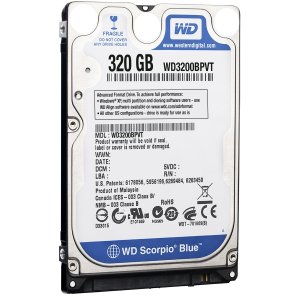
will this hard drive work? i'm asking because it doesn't look like the one used in the tutorial. its a wd3200bpvt


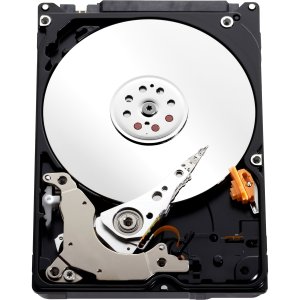
hard drive back.jpg hard drive front.jpg
 
Thank you for the very comprehensive reply. I tried using hddhackr and downloaded hddss.bin files for 60gb + 120gb drives but it wouldn't let me flash the drives.

I looked at the links you suggested and to be honest it looks way too complicated (scary too) for someone with my limited skills so I have bought a couple of 2.5" SATA to USB enclosures on ebay for £5 and will format the 2 drives for use as external PC drives (the 120gb is a Fujitsu drive too).

I found your original tutorial and hddhackr easy to use (at least as far as it would let me go with a non WD drive) and as I now have 2 empty xbox 360 enclosures I will try to buy 2 WD Scorpio drives on ebay and try again.

I will post again when I have upgraded the Xbox drives as I am confident it will be a success.
 
Xplorer360

First, I would like to thank everybody who work on this tutorial. I receive my 320 GB WD HDD one hour ago, followed instructions and everything went fine! I am now trying to get the stuff from my 20 GB HDD to my PC in order to load it onto my newly hacked 320 GB HDD. What happens is I do not have the option to backup or restore partition. I can only backup or restore image.

Also.. I do not see any of my data on partition 0 and partition 3..

Can I just backup the image of the whole HDD and restore it the new?

Thank you in advance.
 
First, I would like to thank everybody who work on this tutorial. I receive my 320 GB WD HDD one hour ago, followed instructions and everything went fine! I am now trying to get the stuff from my 20 GB HDD to my PC in order to load it onto my newly hacked 320 GB HDD. What happens is I do not have the option to backup or restore partition. I can only backup or restore image.

Also.. I do not see any of my data on partition 0 and partition 3..

Can I just backup the image of the whole HDD and restore it the new?

Thank you in advance.

There are 2 versions you need to use. Xplorer 360 extreme is for copying data from the 20gb drive and backing up the partition 2, this can be also used to restore partition 2 to any drive size.

The other version xplorer 360 320gb version is only to be used for 320gb drives.
 
There are 2 versions you need to use. Xplorer 360 extreme is for copying data from the 20gb drive and backing up the partition 2, this can be also used to restore partition 2 to any drive size.

The other version xplorer 360 320gb version is only to be used for 320gb drives.

This is what I just had figured out before reading you reply! Thanks to you anyway!
This forum is a great help!!!
 
everything is going smoothly until i get to the part that says "enter the file name for sector 16-22". I type HDDSS.BIN exactly how i named the bin file and then it says "File HDDSS.BIN is not present!" Why is it telling me that?
 
everything is going smoothly until i get to the part that says "enter the file name for sector 16-22". I type HDDSS.BIN exactly how i named the bin file and then it says "File HDDSS.BIN is not present!" Why is it telling me that?

You have probably renamed it to HDDSS.BIN.BIN if windows is set to hide known extensions for file types, if so remove one of the .BIN extensions and it should work fine.
 
Hello, I read many pages of this thread but none of them solved one question I have, I did this tutorial, restored partition 2 but when I'm plugging back on my 360 it doesn't recognize the HD. I tried to use MHDD and set the native LBA adress and it seems that it is fine, but when I plug back in the 360 it doesn't recognize...
 
Hi Insanenutter, I managed to pick up 2 WD Scorpio blue drives 120gb & 250gb on ebay and flashed them both following your tutorial using HDDhackr.

I did the 120gb first and it was perfect and done in under 5 mins (including opening up the Dell and disconnecting the 3.5" drives), I then made a newb mistake on the 250gb and flashed it with the 120gb hddss.bin and didn't realise until I reassembled the drive shell and put it on the Xbox 360.

About 20 minutes later after an undo and re-flash I now have 2 working Xbox 360 drives which I then formatted on the consoles using their console serial numbers.

As the boys had originally used a transfer cable and a Xport 360 dock to corrupt the official drives I then used the supplied Xport 360 software to restore partiton 2 and transfer the content and that worked fine too.

I also managed to sell the Fujitsu 60gb & 120gb drives formatted NTFS on ebay and get about 70% of my costs back.

My grandson is thrilled as he has ended up with a 250gb instead of a 60gb and now thinks I am a a genius but I know that it is you that deserves that accolade.

I can't thank you enough for the brilliant and easy to follow guide.

Cheers
 
The real genius are the guys who created the software allowing us to do this, all i did was piece all the different programs / steps together and tried to make the process as easy as possible!

Glad you managed to get everything sorted out and your grandson is happy. Its always nice to hear some good feedback once in a while (Y)
 
Hey i recently flashed a 250gb WD hard drive with this method and it worked, but its been about 4-5 days now since i last did it and now my xbox360 can't read my hard drive any more. My xbox cant download items to the hard drive, or access any content within the hard drive, plus when i try log onto a profile with the hard drive in there my Xbox just freezes and crashes but when i take the drive out it works perfectly fine, does anyone know why this is happening?
 
Hey i recently flashed a 250gb WD hard drive with this method and it worked, but its been about 4-5 days now since i last did it and now my xbox360 can't read my hard drive any more. My xbox cant download items to the hard drive, or access any content within the hard drive, plus when i try log onto a profile with the hard drive in there my Xbox just freezes and crashes but when i take the drive out it works perfectly fine, does anyone know why this is happening?

That sounds like corruption on the HDD to be honest. If you are willing, try reformatting it on the xbox itself via device options under storage. If that fixes it viola!

If you are not willing to try that, try deleting your profile only from the HDD, delete system cache 2x, and reboot.

Once back up, redownload your profile, best of luck :)
 
Hello, I read many pages of this thread but none of them solved one question I have, I did this tutorial, restored partition 2 but when I'm plugging back on my 360 it doesn't recognize the HD. I tried to use MHDD and set the native LBA adress and it seems that it is fine, but when I plug back in the 360 it doesn't recognize...

The only solution I found was to use party buffalo to take all the data from the xbox HDD on my PC and do the whole process with the xbox HDD again, but I don't feel like doing this.
Does anybody got the same problem as me ?
Thanks.
 
Last edited:

About Digiex

Digiex is a technology and gaming forum, founded in 2004 by InsaneNutter and Nimrod. Digiex has served the internet community with breaking news, detailed guides, exclusive downloads and a popular discussion forum. A small, friendly community of like‑minded people has developed over the years. People are encouraged to register and participate in on‑going discussions.

Get Social

Back
Top Bottom