
You are using an out of date browser. It may not display this or other websites correctly.
You should upgrade or use an alternative browser.
You should upgrade or use an alternative browser.
Xbox 360 Jtag or RGH Hack Easy Update to Dashboard 17502 with XeBuild GUI
- Thread starter InsaneNutter
- Start date

Specter
Elite Member
Very nice tutorial
Thanks a lot
Thanks a lot
hey, my case is similiar with Santicjs (thread 2 post #61) the thing i wanna ask you is when he/she said 'I do not have the original nand dump so I did it with the nand i extract from the xbox' how i extract my original nand dumper from my xbox?
ps : as long as i play, i believe that my xbox is RGH (beacuse the dealer told me so), but i never open my xbox so i dont know there is a modchip in there or not
Thank You for your time to help me, master
ps : as long as i play, i believe that my xbox is RGH (beacuse the dealer told me so), but i never open my xbox so i dont know there is a modchip in there or not
Thank You for your time to help me, master

InsaneNutter
Resident Nutter
You dont need your original nand dump, in fact its better to use a dump of your current hacked nand as XeBuild can extract all the settings from it.
You can basically follow the process in this tutorial from start to finish, here's how to dump your existing nand over your network: https://digiex.net/guides-reviews/c...board-kernel-16747-xebuild-gui.html#post68858
You can basically follow the process in this tutorial from start to finish, here's how to dump your existing nand over your network: https://digiex.net/guides-reviews/c...board-kernel-16747-xebuild-gui.html#post68858
smokingiron
New Member
- Joined
- Dec 21, 2014
- Messages
- 2
Hi InsaneNutter! Can you please send me a nand in private? I can't do the image write because this error: **** could not read kv.bin (-1) ****
******* ERROR: critical bootloader files are missing, cannot proceed!
***** FATAL BUILD ERROR: -1 unable to complete NAND image
---------------------------------------------------------------
xeBuild Finished. Have a nice day.
---------------------------------------------------------------
xeBuild ERROR: image build error
ERROR: There was one or more fatal errors: 1 errors during the build process
Cleaning data and temporary directories... Done!
******* ERROR: critical bootloader files are missing, cannot proceed!
***** FATAL BUILD ERROR: -1 unable to complete NAND image
---------------------------------------------------------------
xeBuild Finished. Have a nice day.
---------------------------------------------------------------
xeBuild ERROR: image build error
ERROR: There was one or more fatal errors: 1 errors during the build process
Cleaning data and temporary directories... Done!
InsaneNutter
Resident Nutter
You have to use the nand from your own console, you can't use someone elses.
What i would suggest is to dump your raw flash as described here and use that to build your new hacked nand.
Also ensure your CPU key is correct.
What i would suggest is to dump your raw flash as described here and use that to build your new hacked nand.
Also ensure your CPU key is correct.
InsaneNutter
Resident Nutter
I have update the guide for the 17150 dashboard which was released a few days ago.
smokingiron
New Member
- Joined
- Dec 21, 2014
- Messages
- 2
I tried all way, but no luck. Same error message all the time 
Bigdogontop
Active Member
- Joined
- Oct 18, 2011
- Messages
- 31
Do I need to do this to play newer games on my RGH xbox like Madden 15 or Assassins Creed Unity?
InsaneNutter
Resident Nutter
I tried all way, but no luck. Same error message all the time
Are you sure you have typed the correct cpu key in?
Do I need to do this to play newer games on my RGH xbox like Madden 15 or Assassins Creed Unity?
If the games don't work then yes, usually you only need to be on a recent dash to play new games, not the latest. However it will never hurt to be up to date!
Dear InsaneNutter,
I am new to this forum. Please guide me and bear with my innocent Qs.
I am having 16747 dashboard/ kernel. It was earlier done by someone. Now I want to upgrade it to 17150 on my own. My Console is cracked but I am not sure if it is flashed DVD drive or something else. I can only say that i don't get this XELL RELOADED page when I power ON Xbox with eject button.
i copied the NAND Flasher 360 on my pen drive and connected to the console. But i am not able to load the application into my console. When i select the USB, it asks for the standard Configure Now & Customize option and it doesn't show the content of the drive. Kindly help me out.
I am new to this forum. Please guide me and bear with my innocent Qs.
I am having 16747 dashboard/ kernel. It was earlier done by someone. Now I want to upgrade it to 17150 on my own. My Console is cracked but I am not sure if it is flashed DVD drive or something else. I can only say that i don't get this XELL RELOADED page when I power ON Xbox with eject button.
i copied the NAND Flasher 360 on my pen drive and connected to the console. But i am not able to load the application into my console. When i select the USB, it asks for the standard Configure Now & Customize option and it doesn't show the content of the drive. Kindly help me out.
Hi InsaneNutter
I've been out of the scene for a while, trying to update from 16202.
I dump my Nand and generated a new one, this is what it looks like.. I am concerned about the
CF LDV and especially the KV Type which are both different from your sample screenshot.
Is this anything I should be conerned about? Should I go ahead and flash my xbox with this generated nand?
Thanks for your help
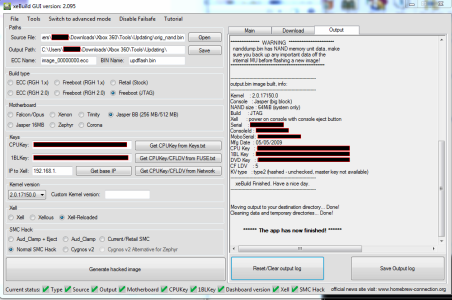
I've been out of the scene for a while, trying to update from 16202.
I dump my Nand and generated a new one, this is what it looks like.. I am concerned about the
CF LDV and especially the KV Type which are both different from your sample screenshot.
Is this anything I should be conerned about? Should I go ahead and flash my xbox with this generated nand?
Thanks for your help
Last edited:
InsaneNutter
Resident Nutter
I am concerned about the
CF LDV and especially the KV Type which are both different from your sample screenshot.
Is this anything I should be conerned about? Should I go ahead and flash my xbox with this generated nand?
That's perfectly fine, all these will be different depending on the Xbox 360 been updated.
It sounds like you cant load Xell, so the only thing you can do now is solder a hardware nand flasher to the motherboard of the Xbox.
the procedure for updating the kinect and avatar is confusing........can u please add some pictures. i can not seem to get it at all. would appreciate a 1 on 1 tutorial.......
Dear InsaneNutter,
First, I just wanna say thank to you, I already followed your tutorial, and it works! Thank you very much!
Im using Xbox 360 slim Trinity 4GB + external HDD 500GB.
After I updated to 16757, whenever I turn my console on with the external HDD connected to the console, it always boot to Freestyle Manager dashboard, and I couldn't find my game there. Can you help me? How to play games from Freestyle Manager dashboard?
Or how to switch from Freestyle Manager dashboard to Normal Dashboard?
But, if I turn my console on without connecting my external HDD, my console boot to normal dahsboard. And I have to re-connect my external HDD to the console after my LED TV displaying Normal dashboard.
Everytime I wanted to turn my console on, I have to disconnect my external HDD first, then after my console succesfully boot to Normal dashboard, I have to re-connect my external HDD, to play my games via Xex.
My question is, how to boot my console in Normal dashboard with the external HDD connected to the console??Just like before I updated to 16757?
(FYI: before I updated to 16757, I was using 16203, and I never disconnected my external HDD from the console, but I never face this problem before. My console always boot to Normal dashboard even the external HDD is connected to the console)
This is the picture after I updated to 16757,
Pict 1: When I connect my external HDD, my console always boot to Freestyle Manager dashboard, I couldn't find my games there, and I couldn't play game from there.
View attachment 14168
Pict 2: When I disconnect my external HDD before turn my console on, and then turn my console on, my console can boot to Normal Dashboard.
View attachment 14169
After this dashboard displayed, I have to re-connect my external HDD to play the games via Xex.
Help me, please.
You need to edit your Dashlaunch settings, these can usually be found in a launch .ini file on your internal hard drive.
If you download and run Dash Launch you should be able to enable / disable FSD loading when you power the console on. I have mine set to only load FSD when I power the console on if I hold down the B button on the controller.
If you need any more help I can show you my launch.ini settings when i'm home from work.
i have a 4gb slim trinity with a 250gb internal hard disk which runs on freeboot (RGH 1.x) modding
i have a similar problem....before i updated my dashboard from 16547 to 17150, FSD used to be the default dashlunch. after updating the dashboard successfully, FSD does not load as the default dashboard......what did i do wrong and how can i get FSD to load as default
InsaneNutter
Resident Nutter
In regards to loading FSD did you install Dash Launch after updating your nand?
usamahasan
New Member
- Joined
- Mar 14, 2015
- Messages
- 1
Works smooth on my Jasper512mb Jtag. Thanks for the post

Kleinn Lamperouge
New Member
- Joined
- May 9, 2015
- Messages
- 2
Is there any other way to power up my console without using the eject button (my eject button seems to be broken) .

InsaneNutter
Resident Nutter
Tutorial updated for the latest 17349 system update, the big new feature here is you can now (officially) use up to 2TB USB drives which have been configured for use with the 360.
I know Jtag / RGH consoles have been able to use 2TB drives for years, however not with the official Microsoft dashboard. This means you can keep your saves / DLC on a USB drive if you wished.
I know Jtag / RGH consoles have been able to use 2TB drives for years, however not with the official Microsoft dashboard. This means you can keep your saves / DLC on a USB drive if you wished.
Similar threads

- Replies
- 230
- Views
- 267K
- Replies
- 112
- Views
- 148K
- Sticky
- Replies
- 33
- Views
- 202K
- Replies
- 174
- Views
- 201K

About Digiex
Digiex is a technology and gaming forum, founded in 2004 by InsaneNutter and Nimrod.
Digiex has served the internet community with breaking news, detailed guides, exclusive downloads and a popular discussion forum. A small, friendly community of like‑minded people has developed over the years. People are encouraged to register and participate in on‑going discussions.
Get Social



