• Welcome to the Digiex Download Center, you are welcome to download anything you like here, no registration is required! We offer direct download links with no captchas or wait times.
    We do our best to ensure no content infringes copyrights, and provide a DMCA Takedown Request Form to request the removal of content from Digiex

Pokemon 10ANNIV Distribution Cartridge GBA Download [ENG, FRE, GER, ITA, SPA]

The English 10ANNIV Distribution has been re-uploaded.

The filler garbage data that pads out the distribution to a perfect 4MB had been previously randomized in attempt to hide an alleged "fingerprint" that Nintendo could have possibly used to trace the source of this distribution. This "fingerprinting" has never been proven fact, so we decided it was in the best interests of proper preservation that the garbage data is reverted back to proper FFs as they originally were. This does not affect the Pokemon distributed what so ever, and will make no difference to anyone distributing Pokemon regardless. It's purely about having a totally clean copy of this distribution preserved.

This re upload reset the download count, however at the time of this post the download count was 5,795.
 
Will we ever see the US version? If i remember correctly, it is supposed to have a Celebi and Space Center Deoxys distribution on it as well as the other 10 pokemon!

There are three US versions of the 10th Anniversary. One is Journey Across America and one is Party of the Decade, both which have the same twenty (yes 20) pokemon. The only difference is the TID numbers and that the PotD Pikachu uniquely knows the move Fly. The third US version is the JAA Celebi and Space Center Deoxys.

To answer your question, no one really knows. As far as I am aware, none are known to exist with private collectors outside of Nintendo. Though as I've said in many posts, these things always continue to pop of over time even when we think there is nothing left to obtain.
 
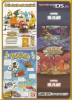
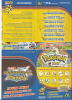
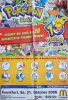
For the sake of preserving and bringing more information around the 10ANNIV event I'd like to share the flyer that you recieved during the German Pokemon Event 2006, as well as the poster you got when attended.
 

Attachments

  • Flyer_back.png
    Flyer_back.png
    8.2 MB · Views: 1,612
  • Flyer_front.png
    Flyer_front.png
    8.2 MB · Views: 1,527
  • poster.jpg
    poster.jpg
    147.6 KB · Views: 1,555
UPDATE:

I used the cheapest flash card and the cheapest link cable on eBay and it worked! I think that if it works for trading, then it should work for transferring event Pokemon. All that is needed is that the "master" GameBoy (the one that says "Awaiting 2p linkup press A to confirm" when trading) is the one with the flashcard inserted. As you can see in the attached pictures, the ends of the link cables are sized differently. In my case with my link cable, the smaller one needs to be attached to the GameBoy with the flash card or else it will not work. Hopefully this is the explanation why it sometimes transferring Pokemon doesn't work with some people (if not, I guess I just got lucky). Hope this helps people that have problems with their third-party link cables.View attachment 16644 View attachment 16645

Hello! I've purchased the same card you got and I've been having tough time trying to patch the 10th ANNIV, berry glitch fix and aurora ticket rom. For some unknown reason, everytime I patch it, I always get patching fail. I've already tried running the program as admin but it won't work. I posted the pic as an attachment.

How did you make it work on your flash card? Can someone fix my problem? Please help!
 

Attachments

  • 0E867348-74AA-466B-BE6D-DCF352C43E6A.jpeg
    0E867348-74AA-466B-BE6D-DCF352C43E6A.jpeg
    1.7 MB · Views: 1,043
For the sake of preserving and bringing more information around the 10ANNIV event I'd like to share the flyer that you recieved during the German Pokemon Event 2006, as well as the poster you got when attended.

i remeber back on this Day, it was my fist Pokemon Day
and i didn't know that it was possible to get more than 1 Pokemon :(


another question, do we have the MultiDistro where youcan choose the Language when you start?
 
I have it downloaded on the MicroSD chip for the EZ Flash Omega GBA Cart. It was working without any issues. It worked perfectly. However, yesterday I went to load it up and I get this error 4 message while the screen was "creating/saving a file." The same thing with the other GBA downloadable content. What does that mean?

Edited: Never mind, I fixed it. I had to format the MicroSD card after transferring the files to another card and transfer them back go the original MicroSD card.
 
Last edited:
So for someone who doesn't have the tools or resources could I still some how get these or someone with the set up get them for me?
 
im trying to do the distribution on an emulator (vba-m), are there specific instructions for this?

Have a look at this post here: https://digiex.net/threads/pokemon-...d-eng-fre-ger-ita-spa.14897/page-2#post-77858

So for someone who doesn't have the tools or resources could I still some how get these or someone with the set up get them for me?

The most easy way to get these event Pokemon would be to use DS Lite and a flash card, you can then restore this save game to Pokemon Fire Red: Pokemon GEN3 Legit Event Pokemon Save

If you already have a DS or DS Lite flash cards are pretty cheap, it might be an idea to list what hardware you have to work with?

Looking at your IP address your at the other side of the world to me so it just wouldn't be cost effective for you to send your games to me to distribute the Pokemon for you.
 
Is there a Discord group relating to Pokemon Preservation? I've been taking a serious interest in this stuff lately, specifically with Gen 3 Era, and was curious if there was a place to chat with everyone. I'm also hoping to make a contribution eventually if possible.
 
Is there a Discord group relating to Pokemon Preservation? I've been taking a serious interest in this stuff lately, specifically with Gen 3 Era, and was curious if there was a place to chat with everyone. I'm also hoping to make a contribution eventually if possible.
Theres the Project Pokemon Discord, some of the Digiex Mods and Users are there as well, discussing events and hardware.
https://discord.com/invite/66PzPgD
 
I should've posted my emulator instructions here a long time ago, and I've had several people ask me about how to work this with an emulator, but I've still only kept the instructions shared in private for whatever reason. Aurora Ticket, Aura Mew, and Shiny Zigzagoon are straightforward with an emulator, but getting the 10Anniv to work with an emulator is a bit more complicated than normal, something to do with having multiple selections it seems.

----------

First, you need "VBALink 1.8" to achieve successful Link Cable emulation, as other VBA versions will not work. I have a zip file of VBALink-1.8 attached to this post. After downloading, open the "VisualBoyAdvance" application twice, which should give you two VBA windows. Next, in both windows, go to 'Options > Emulator > Select BIOS file'. You'll find the "0-gba_bios" folder included in the same zip attached to this post, which contains the bios file to select. After that, in both windows, go to 'Options > Emulator > Use BIOS file'. The bios is needed to display the "GAMEBOY Advance" boot up screen where you hold Start+Select to connect to the distro rom via multiboot mode. Also make sure to check/set up the key configurations so you know each windows' button controls. Also make sure 'Options > Wireless Adapter' is NOT checked, and that 'Options > Emulator > Pause when inactive window' is NOT checked.

Next, open the distribution rom in the first window. It must be in this window to work. Then open your actual Pokemon game rom in the second window. Again, they must be in the proper windows, very important.

While you're on the "GAMEBOY Advance" boot screen in the second window, hold window2's Start and Select keys to allow it to connect with the distro rom. Once that is done properly, the "Nintendo" logo will disappear. Quickly select a pokemon in window1 and wait for it to connect. It may take a few seconds before the colored Nintendo logo shows up in window2, and window1 may appear to freeze a bit, but give it a few seconds to work out. Once window1 goes back to the selection screen, window2 should "permanently" freeze with a white screen. To unfreeze, select any pokemon again in window1, and window2 should unfreeze and finish distributing the originally selected pokemon. After that, you can go to 'File > Reset' in window2 to start the process over again.

Note: .sa2 means the save is for window2. If you try to load the game in window2 with a .sa1 savefile, it won't work unless you first rename your savefile to .sa2, which you can then revert when you're done.

Are there updated instructions for the nightly builds of VBA-m? I can successfully follow these instructions with the provided download for VBALink 1.8, but that uses such an outdated version of VisualBoyAdvance. I was unable to get this to work on the nightly builds of VBA-m, I got the nintendo logo to appear on window2, after starting it in multiboot mode, but then window2 stuttered a bit and eventually froze with window1 still trying to transfer. It'd be great to be able to use the newer version, and maybe its a bug with VBA-m, but there are a lot of configuration options, so maybe I missed one why trying to get it to work.
 
Are there updated instructions for the nightly builds of VBA-m? I can successfully follow these instructions with the provided download for VBALink 1.8, but that uses such an outdated version of VisualBoyAdvance. I was unable to get this to work on the nightly builds of VBA-m, I got the nintendo logo to appear on window2, after starting it in multiboot mode, but then window2 stuttered a bit and eventually froze with window1 still trying to transfer. It'd be great to be able to use the newer version, and maybe its a bug with VBA-m, but there are a lot of configuration options, so maybe I missed one why trying to get it to work.

I personally never use VBA-m for multiplayer emulation, I prefer mGBA or NO$GBA. But I remember that there is an option in "Emulation" tab (Pause when inactive) that has to be disabled in order to make multiplaying work.
Have you try that?
 
I can’t seem to get this distribution to work with an everdrive and a genuine cart and cable and tried many times. Anything I could be getting wrong?
 
I can’t seem to get this distribution to work with an everdrive and a genuine cart and cable and tried many times. Anything I could be getting wrong?
I personally use an EZ Flash Omega, so I don't know exactly how an Everdrive works, but, if you can't open the rom and an option to change save type exists, you should try to set FLASH 128KB as save type.

If you can open the rom, but the distribution doesn't start... have you tried both distribution methods? (hold start+select on the 2nd GBA with che cart inserted - turn on your 2nd GBA without the cart and then put the cart inside when you see the colored Nintendo logo)
Are you using the "1P" part of the cable with the distribution cart and the "2P" with the second GBA with your game cart?
 
Top Bottom